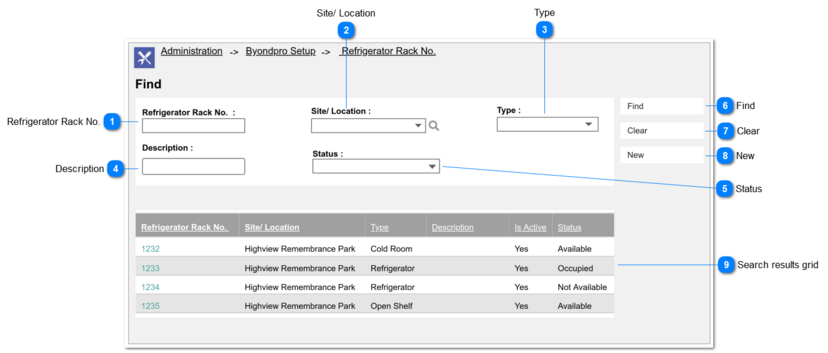
Refrigerator Rack No.
|
Type
|
Notes
|
Rules
|
Compulsory
|
Placeholder
|
Format
|
Edit
|
Size
|
Default
|
Messages
|
|
Text Field
|
-
|
This allows to enter any characters including numbers, letters and special characters.
|
-
|
-
|
Text
|
-
|
-
|
-
|
-
| |
|
 Site/ Location
|
Type
|
Notes
|
Rules
|
Compulsory
|
Placeholder
|
Format
|
Edit
|
Size
|
Default
|
Messages
|
|
Advanced
Search Select
|
Pre-conditions:
1. There should be at least one created/ registered Site.
|
1. List the names of the Site and order by ASC.
2. The columns displayed as the "View Fields" in the lookup will be,
|
-
|
-
|
Text
|
-
|
-
|
-
|
-
| |
|
 Type
|
Type
|
Notes
|
Rules
|
Compulsory
|
Placeholder
|
Format
|
Edit
|
Size
|
Default
|
Messages
|
|
Selection
|
Pre-conditions:
1. There should be at least one type created by the system Administrator.
|
1. List the purposes as the options of the selection list. The options are as follows.
|
-
|
-
|
Text
|
-
|
-
|
-
|
-
| |
|
 Description
|
Type
|
Notes
|
Rules
|
Compulsory
|
Placeholder
|
Format
|
Edit
|
Size
|
Default
|
Messages
|
|
Text Field
|
-
|
This allows to enter any characters including numbers, letters and special characters.
|
-
|
-
|
Text
|
-
|
-
|
-
|
-
| |
|
 Status
|
Type
|
Notes
|
Rules
|
Compulsory
|
Placeholder
|
Format
|
Edit
|
Size
|
Default
|
Messages
|
|
Selection
|
Pre-conditions:
1. There should be at least one status created by the system Administrator.
|
1. List the purposes as the options of the selection list. The options are as follows.
|
-
|
-
|
Text
|
-
|
-
|
-
|
-
| |
|
 Find
|
Type
|
Notes
|
Rules
|
Compulsory
|
Placeholder
|
Format
|
Edit
|
Size
|
Default
|
Messages
|
|
Button
|
Post-conditions:
|
1.
Upon clicking the button, search/ fetch the transfer records based on the selected values of the filters in the Find section.
2. If all the search filters are blank/ empty and click on Find button, it will list down all the records in the Search Result grid
3. Fetching records based on the "AND" operation among the search filters.
|
-
|
-
|
-
|
-
|
-
|
-
|
-
| |
|
 Clear
|
Type
|
Notes
|
Rules
|
Compulsory
|
Placeholder
|
Format
|
Edit
|
Size
|
Default
|
Messages
|
|
Button
|
Post-conditions:
1. Clear values of the search filters.
2. Clear values from the Results Table.
|
1. Upon clicking the button, it will clear
|
-
|
-
|
-
|
-
|
-
|
-
|
-
| |
|
 New
|
Type
|
Notes
|
Rules
|
Compulsory
|
Placeholder
|
Format
|
Edit
|
Size
|
Default
|
Messages
|
|
Button
|
-
|
|
-
|
-
|
-
|
-
|
-
|
-
|
-
| |
|
 Search results grid
The grid will consist of following columns
|
Type
|
Notes
|
Rules
|
Compulsory
|
Placeholder
|
Format
|
Edit
|
Size
|
Default
|
Messages
|
|
Refrigerator Rack No.
|
This will act as a hyperlink
|
Upon clicking on the hyperlink, user will be navigated to the summary screen of the particular Refrigerator Rack record.
|
-
|
-
|
-
|
-
|
-
|
-
|
-
|
|
Site/ Location
|
-
|
Site/ Location of the record will be displayed.
|
|
|
|
|
|
|
|
|
Type
|
|
Type of the record will be displayed.
|
|
|
|
|
|
|
|
|
Description
|
|
Description of the record will be displayed.
|
|
|
|
|
|
|
|
|
Is Active
|
|
Active status of the record will be displayed as Active / Inactive
|
|
|
|
|
|
|
|
|
Status
|
|
Status of the record will be displayed.
|
|
|
|
|
|
|
| |
|