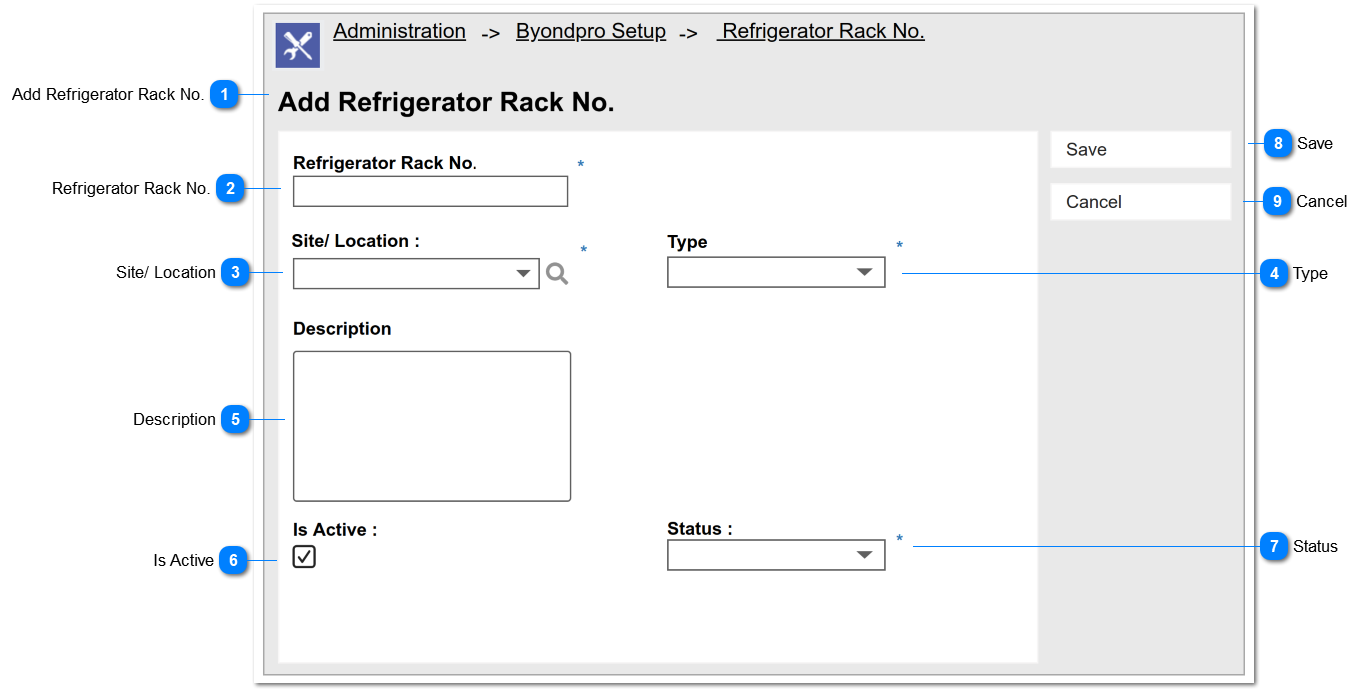
Add Refrigerator Rack No.
|
Type
|
Notes
|
Rules
|
Compulsory
|
Placeholder
|
Format
|
Edit
|
Size
|
Default
|
Message
|
|
Page Header
|
-
|
-
|
-
|
-
|
Text
|
-
|
-
|
-
|
-
| |
|
 Refrigerator Rack No.
|
Type
|
Notes
|
Rules
|
Compulsory
|
Placeholder
|
Format
|
Edit
|
Size
|
Default
|
Messages
|
|
Text Field
|
-
|
1.This allows to enter any characters including numbers, letters and special characters.
2.Rack No should be unique within the selected site
|
Yes
|
-
|
Text
|
Yes
|
-
|
Blank
|
-
|
|
|
 Site/ Location
|
Type
|
Notes
|
Rules
|
Compulsory
|
Placeholder
|
Format
|
Edit
|
Size
|
Default
|
Messages
|
|
Advanced
Search Select
|
Pre-conditions:
1. There should be at least one created/ registered Site.
|
1. List the names of the Site and order by ASC.
2. The columns displayed as the "View Fields" in the lookup will be,
|
Yes
|
-
|
Text
|
-
|
-
|
-
|
-
| |
|
 Type
|
Type
|
Notes
|
Rules
|
Compulsory
|
Placeholder
|
Format
|
Edit
|
Size
|
Default
|
Messages
|
|
Selection
|
Pre-conditions:
1. There should be at least one type created by the system Administrator.
|
1. List the purposes as the options of the selection list. The options are as follows.
|
Yes
|
-
|
Text
|
-
|
-
|
-
|
-
| |
|
 Description
|
Type
|
Notes
|
Rules
|
Compulsory
|
Placeholder
|
Format
|
Edit
|
Size
|
Default
|
Messages
|
|
Text Field
|
-
|
This allows to enter any characters including numbers, letters and special characters.
|
No
|
-
|
Text
|
Yes
|
-
|
Blank
|
-
| |
|
 Is Active
|
Type
|
Notes
|
Rules
|
Compulsory
|
Placeholder
|
Format
|
Edit
|
Size
|
Default
|
Messages
|
|
Check Box
|
Post Condition :
If this field = false
|
Then this filed cannot be unticked
|
No
|
-
|
-
|
Yes
|
-
|
Ticked
|
-
| |
|
 Status
|
Type
|
Notes
|
Rules
|
Compulsory
|
Placeholder
|
Format
|
Edit
|
Size
|
Default
|
Messages
|
|
Selection
|
Pre-conditions:
1. There should be at least one status created by the system Administrator.
2. In order to enable this filed Is Active = True
|
1. List the statuses as the options of the selection list. The options are as follows.
-
-
-
Not Available : This should not be allowed to select by the user.
|
Yes
|
-
|
Text
|
-
|
-
|
Available
|
-
| |
|
 Save
|
Type
|
Notes
|
Rules
|
Compulsory
|
Placeholder
|
Format
|
Edit
|
Size
|
Default
|
Messages
|
|
Button
|
-
|
Upon clicking this button:
If all the mandatory fields are filled,
Then record will be saved.
Success message will be prompted.
Else
Error message should be prompted.
|
-
|
-
|
-
|
-
|
-
|
Enable
|
Success Message:
Refrigerator Rack record has been created.
Error Message :
Default SAGE CRM error message for Mandatory fields
| |
|
 Cancel
|
Type
|
Notes
|
Rules
|
Compulsory
|
Placeholder
|
Format
|
Edit
|
Size
|
Default
|
Messages
|
|
Button
|
|
Upon clicking the button:
1. Clear/ reset all the input elements.
|
-
|
-
|
-
|
-
|
-
|
Enable
|
-
| |
|