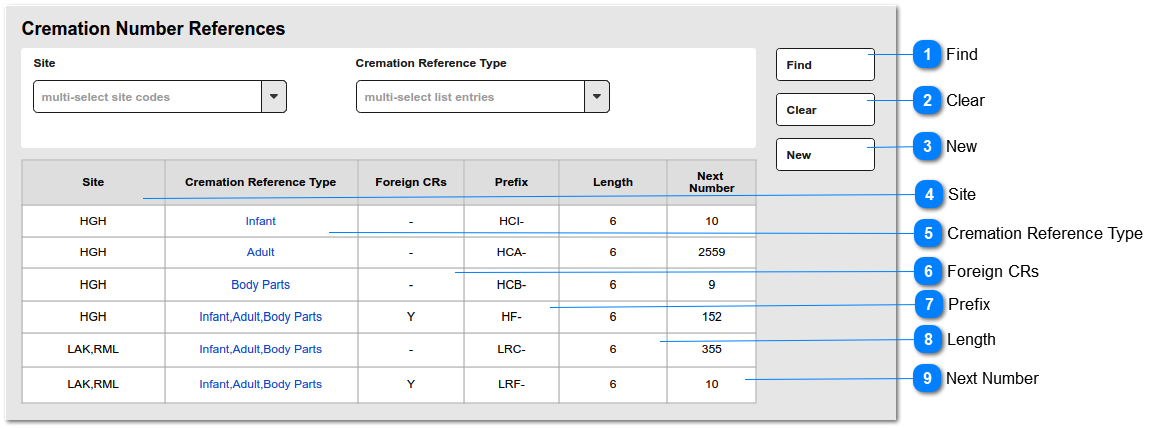
CHANGE October 2023: This update REPLACES any logic for CR numbering previously managed via the Reference Number entries: CRRef or CRRef:Foreign Same logic applies to numbering from NEW cremated remains screen access from NEW menu or S&B/Cremated Remains tab header
Find
This is an action button to initiate a new search based on the filter criteria selected
Type
Notes
Rules
Compulsory
Format
Edit
Size
Default
Error Message
Button
1.Selecting the FIND button will initiate a search of the Cremation Number Reference entries, filtered according to: - Site - Cremation Reference Type
2. Search results to be listed in the grid shown below.
3. Records will be based on the "AND" operation among the search filters.
This is used to "pad" the Next Number to the desired number of characters by inserting leading zeros, e.g. Prefix: CR- Length: 6 Next Number: 150 Result: CR-000150
1. Defines total number of characters required for the Next Number.
1a. Insert leading 0s after Prefix (7) and before Next Number (9) to meet total number of characters for the Next Number.
This is the next cremation number to be used when creating New Cremated Remains.
1. Allow any number > 1
1a. Allow user to edit with a number smaller than current. (e.g. Next number displays 10, user can reset to 1,2,3...9 or 11, 12,13 ...)
2. Length of next number entered must be <= to the value allowed by Length (8). e.g. Next Number 1000 requires Length 4 or greater. 2a. Validate on SAVE
3. On NEW/EDIT screen, please show the next number, as it will be used. PREFIX + LENGTH/0s + NEXT NUMBER e.g. CR-000150