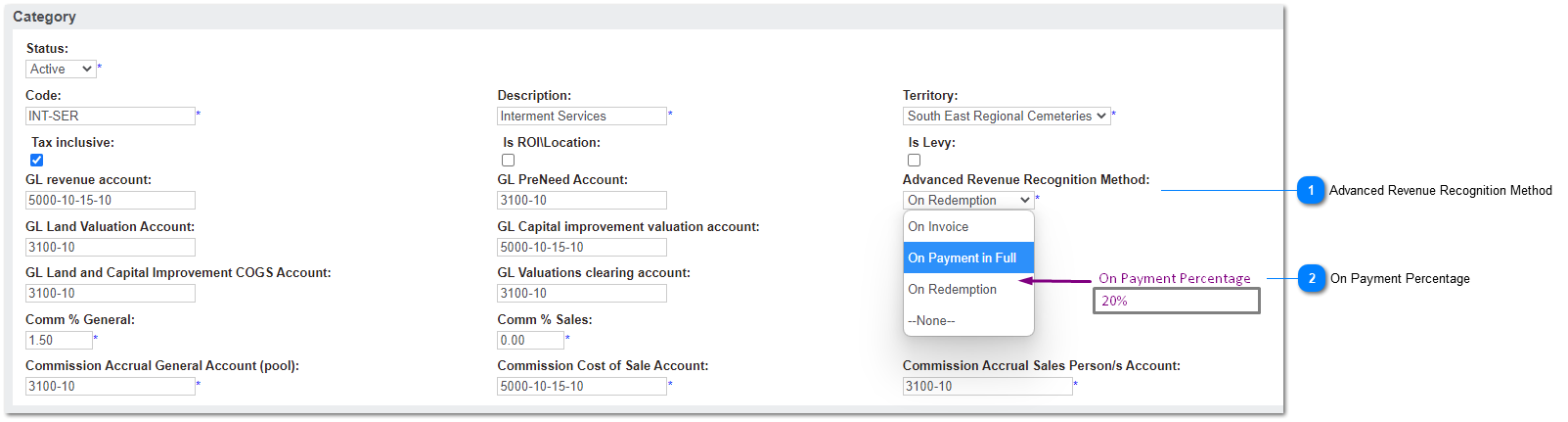
This feature enhancement to the revenue recognition model allows system administrators to define a new trigger to recognise revenue based on a % of (total) invoice payments received.
The % can be defined by Item Category, and conforms to all existing rules for Advanced Revenue Recognition functions, where not specifically mentioned here.
Advanced Revenue Recognition Method
This is the (existing) list of revenue recognition methods, used in conjunction with Pre-Need sales when Advanced Revenue Recognition is active.
This update allows a new option to set a percentage of invoice paid as the trigger to recognise revenue.
Type
Notes
Rules
Compulsory
Format
Edit
Size
Default
Error Message
Selection List
Processing rules for selection list options below are unchanged:
- On Invoice
- On Payment in Full
- On Redemption
1. Add new list option: On Payment Percentage
2. When selected, show field: On Payment Percentage
This field defines the percentage of invoice paid that will trigger revenue recognition journals, if Advanced Revenue Recognition applies and if the product category ARR Method is set to On Payment Percentage.
Type
Notes
Rules
Compulsory
Format
Edit
Size
Default
Error Message
numeric
This option conforms to the same principles as the existing option: On Payment in Full, which triggers pre-need redemption & GL journals when the invoice is 100% paid (in full).
This variation triggers PN redemption when the invoice payment is >= x%.
1. Show field when value of Advanced Revenue Recognition Method is On Payment Percentage.
2. On save, validate amount entered is > 0
2a. If not greater than 0, show error message
PRE-NEED REDEMPTION:
3. Using same principles and detailed actions and field updates as the trigger for "On payment in Full", if total invoice paid amount >= value entered, following actions apply:
3a. Pre-Need entry is marked as redeemed
3b. ERP/GL journals for revenue recognition are created
3c. If ROI/Item, the Location sales status is updated
4. Receipt API and Receipt write-back program should also check for payment X%
5. Re quotes/order details will follow the same rules as ARR method where On Payment in Full checked in order to determine which GL account to use, how to manage the pre-need register entry etc.
Y if ARR Method = On Payment Percentage
2 decimals
Y
2a. On Payment Percentage must be greater than 0%. Please check the settings for Advanced Revenue Recognition.