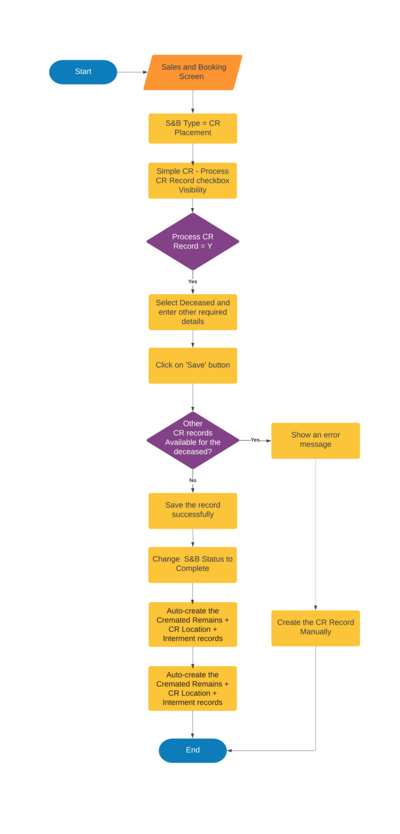
This section is added to implement the simple cremated remain (CR) method configuration for the existing sales & booking screen. All the existing rules will be remained as it is.
Configurations need to be set up
Set up a new configuration to configure the alert type that the user required.
Administration -> Cemetery System Setup -> Custom Configuration -> New
Name : SalesAndBookingSimpleCR
Description: Enable the Simple CR method
Options: Yes, No
Default Value: No
Note: If there is a typo error in the above mentioned option values, system will taken as "No"
Sales & Bookings -> S&B Version 4.0 -> Sales & Bookings Process -> Sales & Booking Summary -> Sale and Booking Status Change Rules -> CR Interment - Completed Status
Process Flow
Below flow chart diagram illustrate how this simple CR method enable for sales & booking -> CR Placement functionality.