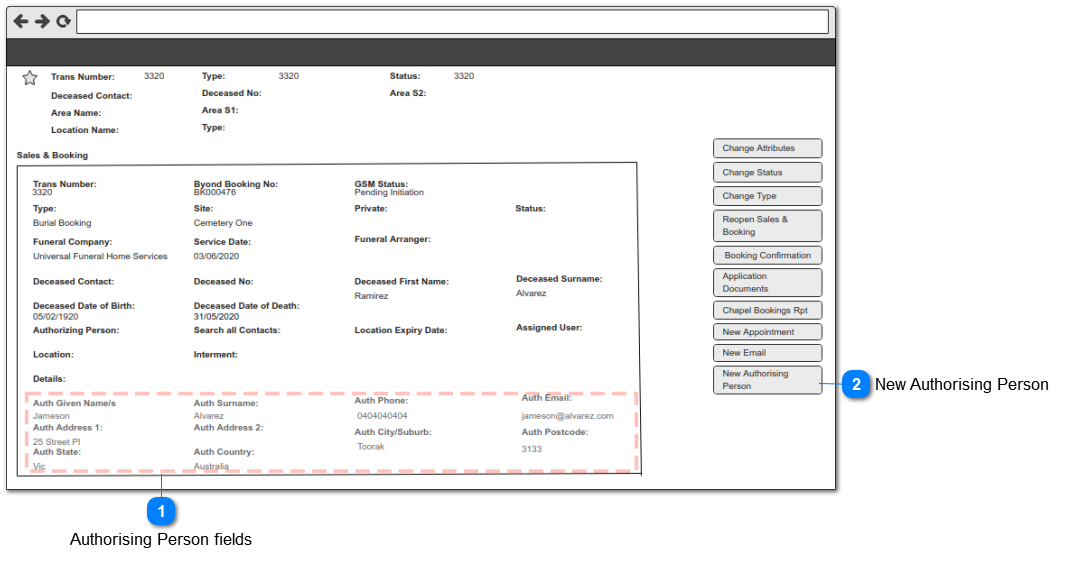
This function will automate the creation of a new Authorising Person, using the data transferred from byond bookings portal into S&B text fields.
Authorising Person fields
The 10 fields enclosed within the dotted highlighted area (red) are populated from byond cemetery / funeral director bookings portal and will be used in the process of the creation of a new authorising person.
The end-user will click on this button - New Authorising Person - to initiate the auto process of creating a new authorising person.
Type
Caption (UK)
Visibility Rules
Compulsory
Format
Edit
Size
Default
Error Message
Button
New Authorising Person
1. Show when the 'Auth Surname' field is populated and the 'Authorizing Person' field is not populated on the Sales & Booking Summary screen.
2. Hide when the 'Auth Surname' and 'Authorizing Person' fields are populated on the Sales & Booking Summary screen.
3. Call the New person CRM function when the 'Auth Surname' and 'Authorizing Person' fields are not populated on the Sales & Booking Summary screen. This is the existing manual process of new person creation from the Sales & Booking Summary screen.