To properly display this page you need a browser with JavaScript support.
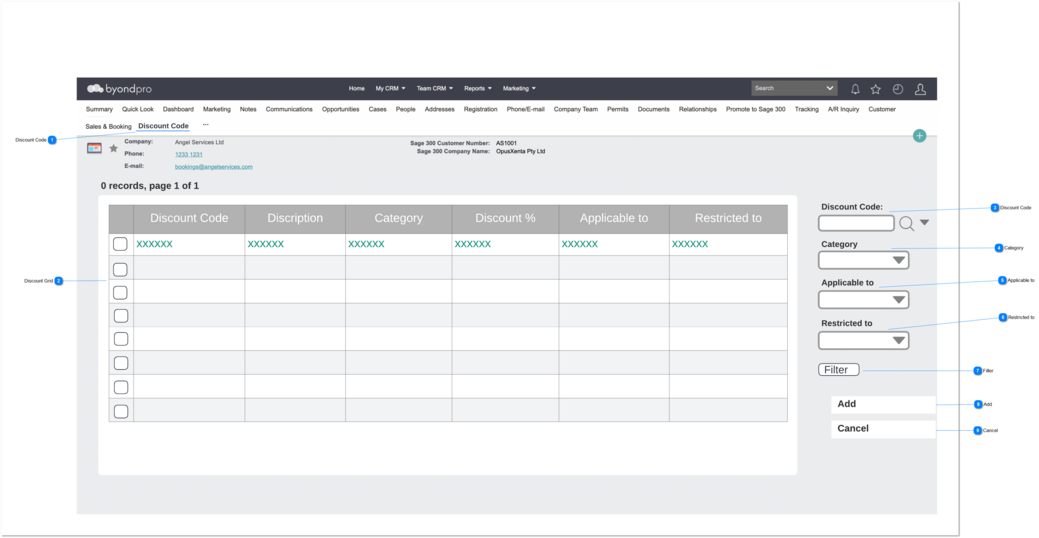
Company : Add Discount Code
User can navigate to the screen using Companies -> Discount Code Tab.
Discount Code
Type
Notes
Rules
Compulsory
Format
Edit
Size
Default
Error Message
Tab Header
1. Tab need to show as the tab header.
-
-
-
-
-
-
Discount Grid
Type
Notes
Rules
Compulsory
Placeholder
Format
Edit
Size
Default
Messages
Column Header
Select
1. Discount code(s) created in the Discount screen will be display. 2. User can select multiple discount codes at once by clicking the checkbox.
-
-
-
-
-
-
-
Column Header
Discount Code
1. Discount code(s) created in the Discount screen will be display.
-
-
-
-
-
-
-
Column Header
Description
1. Description selected Discount screen will be display.
-
-
-
-
-
-
-
Column Header
Category
1. Operational Status selected in the Discount screen will be display.
-
-
-
-
-
-
-
Column Header
Discount %
1. Discount % selected in the Discount screen will be display.
-
-
-
-
-
-
-
Column Header
Applicable to
1. Applicable to selected in the Discount screen will be display.
-
-
-
-
-
-
-
Column Header
Restricted to
1. Restricted to selected in the Discount screen will be display.
-
-
-
-
-
-
-
Discount Code
Type
Notes
Rules
Compulsory
Placeholder
Format
Edit
Size
Default
Messages
Advanced
Search Select
Pre-conditions:
1. List all the discount codes created here.
2. This element conforms to standard CRM advanced search select field controls.
-
-
Text
-
-
-
-
Category
Type
Notes
Rules
Compulsory
Placeholder
Format
Edit
Size
Default
Messages
Selection
Pre-conditions:
1. List all the categories created here .
-
-
Text
-
-
-
-
Applicable to
Type
Notes
Rules
Compulsory
Placeholder
Format
Edit
Size
Default
Messages
Selection
Pre-conditions:
1. List all the applicable to: created here .
-
-
Text
-
-
-
-
Restricted to
Type
Notes
Rules
Compulsory
Placeholder
Format
Edit
Size
Default
Messages
Selection
Pre-conditions:
1. List all the restricted to: created here .
-
-
Text
-
-
-
-
Filter
Type
Notes
Rules
Compulsory
Format
Edit
Size
Default
Message
Button
1. When selected, filter the Discount Code list according to the values selected in:
-
-
-
-
Active
-
Add
Type
Notes
Rules
Compulsory
Placeholder
Format
Edit
Size
Default
Messages
Button
1a. Discount codes included on the Company record will be available for use on Sales Order Detail lines, where the Company is the Bill-To Company on the Sales Order Header.
1. Once the user clicks on this button,
1a. The selected discount code(s) will be added to the grid against the Company record.
1b. A successful message need to display.
-
-
-
-
-
Active
1b. The discount code(s) has been added successfully.
Cancel
Type
Notes
Rules
Compulsory
Placeholder
Format
Edit
Size
Default
Messages
Button
1. Once the user clicks on this button, the system will navigate the user to the company summary page.
-
-
-
-
-
Active
-