To properly display this page you need a browser with JavaScript support.
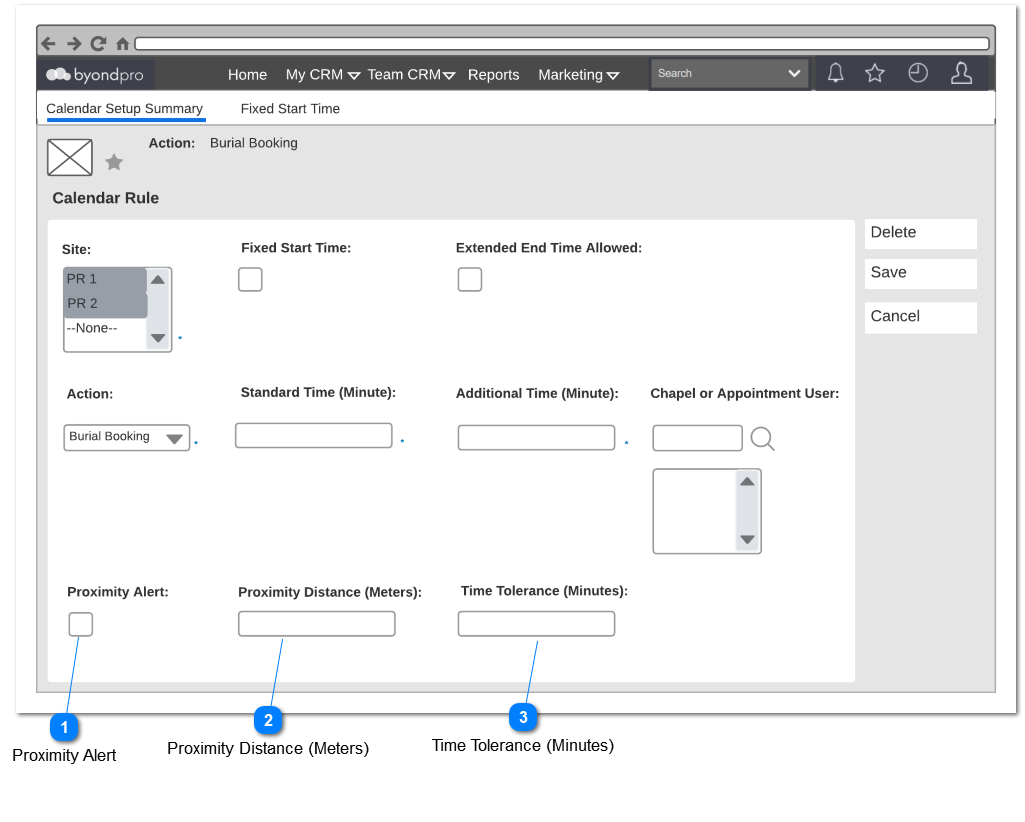
Proximity Alert block has been added to the existing Calendar Rules setup to allow users to define the proximity area when placing a booking within the same time slot.
Proximity Alert
Type
Notes
Rules
Compulsory
Placeholder
Format
Edit
Size
Default
Messages
Check Box
-
Post Condition:
2. Proximity alert will be applied across action
Example: If a chapel booking and burial booking was scheduled within the proximity, proximity alert will be triggered according to set calendar rule.
-
-
-
-
-
-
-
Proximity Distance (Meters)
Type
Notes
Rules
Compulsory
Placeholder
Format
Edit
Size
Default
Messages
Text Field
-
If the user enter Zero/ Null value calendar rule will not be saved.
Pre Condition:
1. In order to enable this field for editing, Proximity Alert field should be selected.
Yes
-
Numbers Only
-
-
-
Value required for Proximity Distance (Meters)
Time Tolerance (Minutes)
Type
Notes
Rules
Compulsory
Placeholder
Format
Edit
Size
Default
Messages
Text Field
-
If the user enter Zero/ Null value calendar rule will note be saved.
Pre Condition:
1. In order to enable this field for editing, Proximity Alert field should be selected.
Yes
-
Numbers Only
-
-
-
Value required for Time Tolerance (Minutes)