byondpro
Functional Specifications
×
Menu
Index

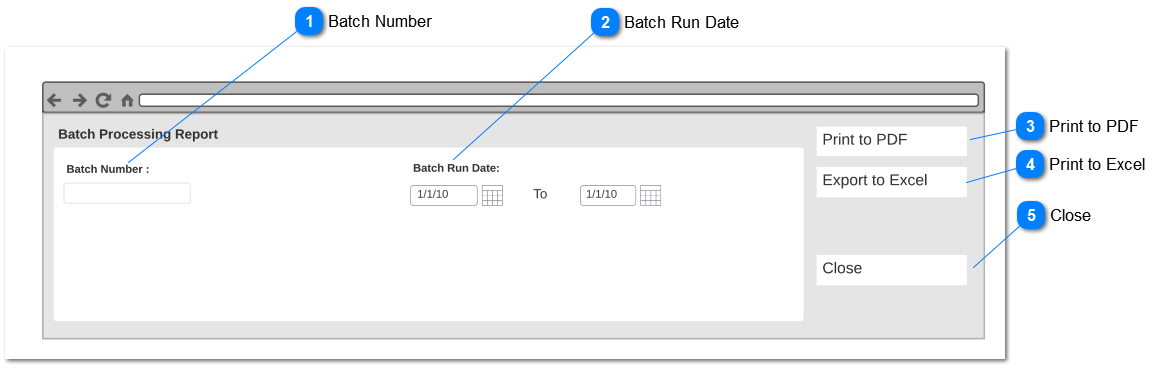
Batch Processing Report - Parameters

This screen will appear on Reports> Finance Reports> Payment Report> Batch Processing Report where a separate screen pop-up to enter Batch Processing Report - Parameters.
 
Batch Processing Report - Parameters
1

Batch Number

 
Type
Notes
Rules
Compulsory
Placeholder
Format
Edit
Size
Default
Messages
 
Search Results by Batch Number generated in Payment Processor Screen
Field should be able to enter numbers, letters and symbols.
-
-
Text
-
-
-
-
2

Batch Run Date

 
Type
Notes
Rules
Compulsory
Placeholder
Format
Edit
Size
Default
Messages
Date Range
-
Select date range is selected filter result based on Batch run date.
 
Batch run date filtered from the Batch run date recorded at the point of executing payment.
 
-
-
-
-
-
-
-
3

Print to PDF

 
Type
Notes
Rules
Compulsory
Placeholder
Format
Edit
Size
Default
Messages
Action Button
-
Clicking the action button will convert

Batch Processing Report

to PDF format.
 
Based on selected parameter Batch Processing Report will be generated batch wise
 
Pre-condition-
At least one filter option should be selected
 
-
-
-
-
-
-
-
4

Print to Excel

 
Type
Notes
Rules
Compulsory
Placeholder
Format
Edit
Size
Default
Messages
Action Button
-
Clicking the action button will convert

Batch Processing Report

to Excel format.
 
Based on selected parameter Batch Processing Report will be generated batch wise
 
Pre-condition-
At least one filter option should be selected
-
-
-
-
-
-
-
5

Close

 
Type
Notes
Rules
Compulsory
Placeholder
Format
Edit
Size
Default
Messages
Action Button
-
Clicking the action button will close Batch Processing Report - Parameter screen will return to Finance Reports list.
-
-
-
-
-
-
-
 
The online help was created with Dr.Explain