Site Records

Purpose
A site record is created for every facility operated by the parent organisation. The site record provides structure to data searches for deceased records, it controls links to locations and pricing within sales and bookings, and helps provide meaningful reporting outcomes.
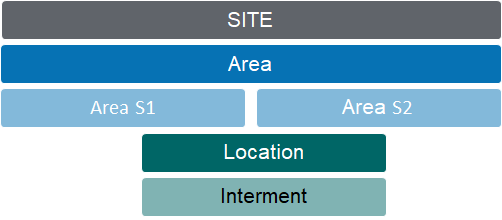
Fit within the Location Hierarchy
The site record is the starting point in developing cemetery location coding structures that mirror the layout of the grounds.
Site Code
The 3-digit code used to identify the site is carried forward through the coding structure of Areas and Locations.
Example:
HGH Highview Remembrance Park
HGH-LAWN Lawn Gardens (at Highview Remembrance Park)
Related Information
Available on the Site Summary:
-
Map Information
-
Notes
-
Documents
-
Cases
-
Tracking
Adding new Records
Site records are created from the generic NEW menu list.
Standard Field List
|
Field
|
Description
|
Associated Business Process
|
|
Primary Site
|
Checkbox
|
Used by the weather button on the Home screen
|
|
Site Code
|
3-digit code
|
|
|
Name
|
Full facility (cemetery) name
|
|
|
Status
|
Selection list that includes Open, Under Development, Closed
|
|
|
Territory
|
Selection list link to CRM territory
|
Configure 1:1 with site records
Controls user security by site & associated records
|
|
Description
|
Free form text for site description
|
|
|
GL Segment Code
|
Referenced by invoice and credit note transactions. 18 controls whether a segment of the General Ledger codes associated with a product relate to the different cemetery, and if so, its position in the coding structure. VALUES: N= No site segment code S= The site segment code is in the starting position E= The site segment code is in the last position Number behind the indicator = the number of digits to be replaced eg. E2: last 2 characters or S3 first 3 characters.
|
|
|
Map Information
| ||
|
Use map facility
|
Checkbox to indicate use of Google map functions
|
|
|
Entry 1 - Name
|
Text field to record name of entrance gate
|
|
|
Entry 1 - Longitude
|
Numeric field to record GPS longitude
|
Establishes default co-ordinates for sub-ordinate area and location records.
|
|
Entry 1 - Latitude
|
Numeric field to record GPS latitude
| |
|
Default Base Map Type
|
Default set as Satelitte
|
|
|
Weather Info Location
|
Text field to record location description displayed on the weather button
Each site has GPS co-ordinates and if a user is linked to a specific territory, they get the weather for that site
|
Location determined by Primary Site's GPS co-ordinates. If left blank, description used per Google Maps.
|
|
Primary Site
|
Primary site is the fall-back GPS co-ordinates for the weather app.
In cases where integrations are in place for byondcloud the function of this tickbox is to denote the Trust/Organisation that will get synchronised with the main account.
|
|