To properly display this page you need a browser with JavaScript support.
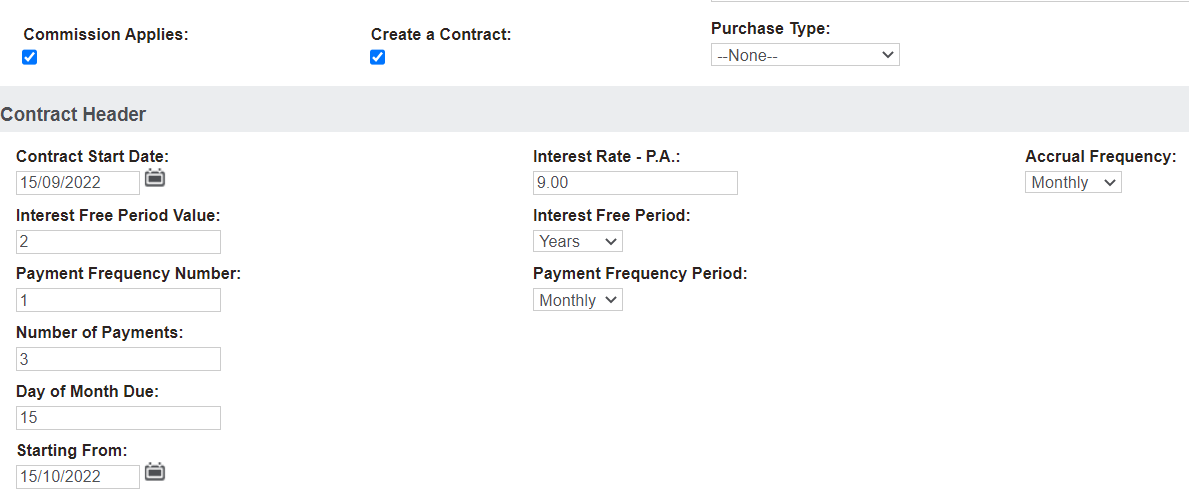
The user enters information into some of the fields, others are auto populated based on configuration settings, these entries are outlined in the table below:
Contract Start Date
User defines
Enter contract start date
Interest Rate – P.A.
ContractDefaultInterestRate
Accrual Frequency
User defines
Typically, this is set to monthly. The default selection list is, monthly, quarterly, weekly.
Interest Free Period Value
ContractDefaultGracePeriodValue
Interest Free Period
ContractDefaultGracePeriod
Payment Frequency Number
User defines
How often are we expecting them to pay in line with the payment frequency period.
Payment Frequency Period
ContractDefaultPaymentFrequencyPeriod
Number of Payments
Defaults to the number of payments defined in the terms setups.
Day of Month Due
Select which day of the month these payments will be due e.g., 15th of the month
Starting From
Adjust only if the payment start differs from today’s date.