byondpro
Functional Specifications
×
Menu
Index

Use Quick Bookings

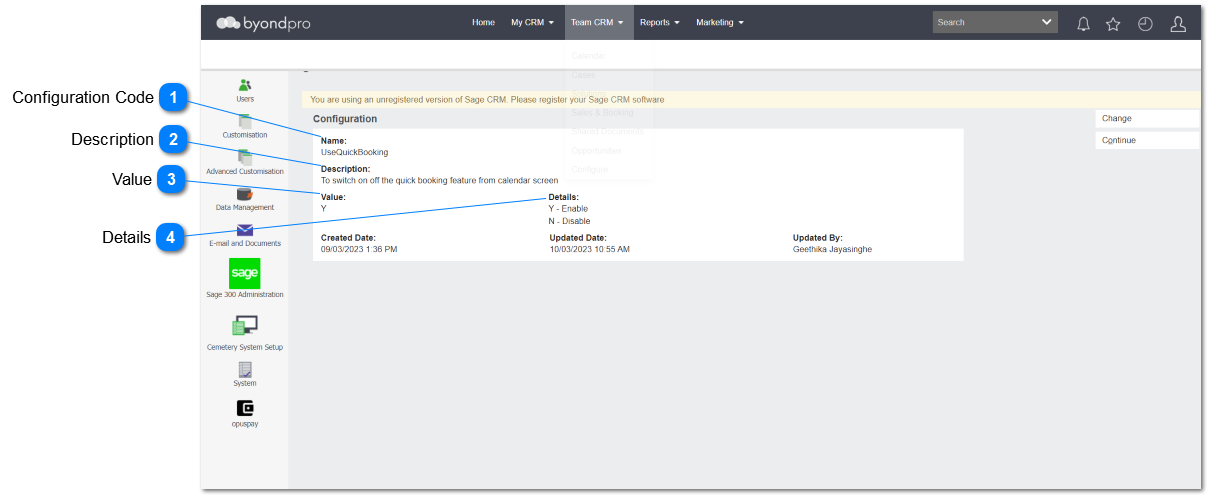
This section is added to implement the configuration to use quick booking  function allowing user to use quick bookings functionality set up in calendar rules.
 
Use Quick Bookings
1

Configuration Code

 
Type
Notes
Rules
Compulsory
Placeholder
Format
Edit
Size
Default
Messages
Text
-
  • Any characters including numbers, letters and special characters can be entered.
     
  • The entered value will be
UseQuickBooking.
 
3. IF the user clicks on the save button, WITHOUT entering a text/ value, the red arrow should be shown as per existing functionality.
Yes
-
Text
Yes
-
-
-
2

Description

 
Type
Notes
Rules
Compulsory
Placeholder
Format
Edit
Size
Default
Messages
Text
-
1. This allows to enter any characters including numbers, letters and special characters.
 
2. The entered value will be:
To switch on off the quick booking feature from calendar screen.
 
3. As this is an optional field, the user will be able to leave this field blank/ empty.
Optional
-
Text
Yes
-
-
-
3

Value

 
This is the Value that determines what action applies
 
Type
Notes
Rules
Compulsory
Format
Edit
Size
Default
Error Message
Text
 
This allows to enter any characters including numbers, letters and special characters.
 
1. If N/Null - no action required
 
2. If Y then activate following features:
2a. Calendar, show Chapel booking button, Burial booking button, Cremation booking button to add quick booking.
2b. Calendar Rule setup, show show default booking record checkbox.
 
As this is an optional field, the user will be able to leave this field blank/ empty.
Yes
 
Yes
 
N/null
 
4

Details

 
Type
Notes
Rules
Compulsory
Placeholder
Format
Edit
Size
Default
Messages
Multi line Text
 
-
1. This allows to enter any characters including numbers, letters and special characters.
 
2. The entered value will be;
Y- Enable
N - Disable
 
3. As this is an optional field, the user will be able to leave this field blank/ empty.
Optional
-
Text
Yes
-
-
-
 
The online help was created with Dr.Explain