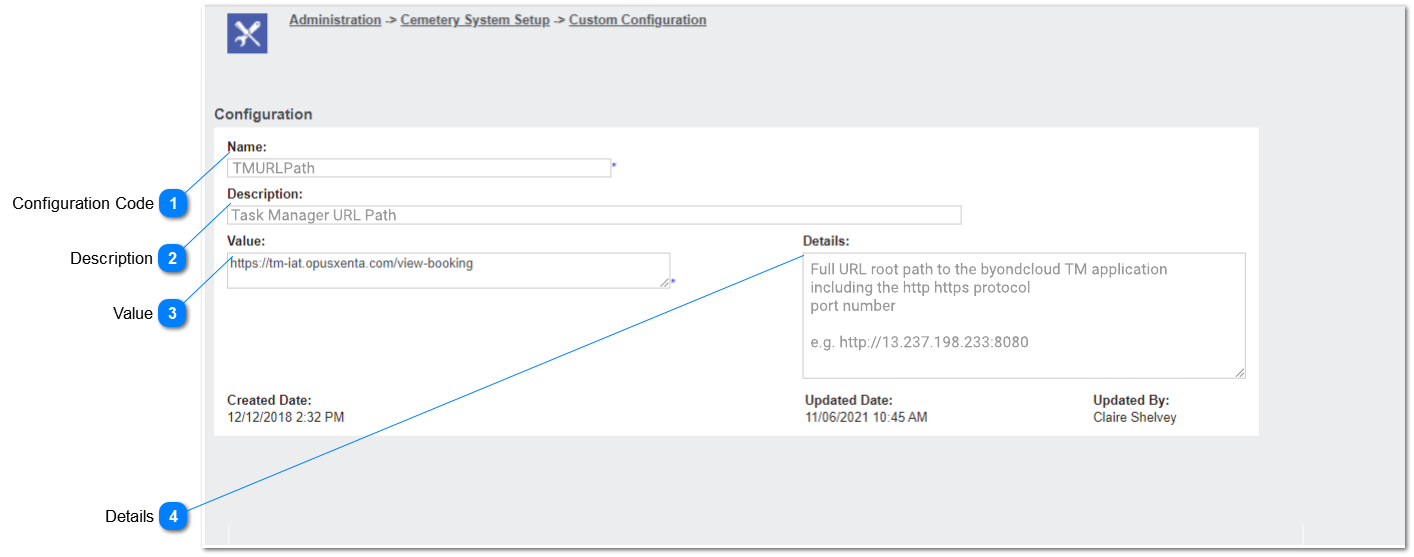
Note:
This enhancement should be applied to the previous 'gsm URL path' custom configuration.
 Configuration Code
|
Type
|
Notes
|
Rules
|
Compulsory
|
Placeholder
|
Format
|
Edit
|
Size
|
Default
|
Messages
|
|
Text
|
-
|
-
Any characters including numbers, letters and special characters can be entered.
-
The entered value will be
TMURLPath.
3. IF the user clicks on the save button, WITHOUT entering a text/ value, the red arrow should be shown as per existing functionality.
|
Yes
|
-
|
Text
|
Yes
|
-
|
-
|
-
| |
|
 Description
|
Type
|
Notes
|
Rules
|
Compulsory
|
Placeholder
|
Format
|
Edit
|
Size
|
Default
|
Messages
|
|
Text
|
-
|
1. This allows to enter any characters including numbers, letters and special characters.
2. The entered value will be:
Task Manager URL Path
3. As this is an optional field, the user will be able to leave this field blank/ empty.
|
Optional
|
-
|
Text
|
Yes
|
-
|
-
|
-
| |
|
 Value
|
Type
|
Notes
|
Rules
|
Compulsory
|
Placeholder
|
Format
|
Edit
|
Size
|
Default
|
Messages
|
|
Multiline Text
|
-
|
1. This allows to enter any characters including numbers, letters and special characters.
2. The entered value will be;
https://tm-iat.opusxenta.com/view-booking
3. IF the user clicks on the save button, WITHOUT entering a text/ value, the red arrow should be shown as per existing functionality.
4. Refer here for updated rules on hyperlink re-direction
|
Yes
|
-
|
Text
|
Yes
|
-
|
No
|
-
| |
|
 Details
|
Type
|
Notes
|
Rules
|
Compulsory
|
Placeholder
|
Format
|
Edit
|
Size
|
Default
|
Messages
|
|
Multi line Text
|
-
|
1. This allows to enter any characters including numbers, letters and special characters.
2. The entered value will be;
Full URL root path to the byondcloud TM application
including the http https protocol
port number
e.g. http://13.237.198.233:8080
3. As this is an optional field, the user will be able to leave this field blank/ empty.
|
Optional
|
-
|
Text
|
Yes
|
-
|
-
|
-
| . |
|