byondpro
Functional Specifications
×
Menu
Index

Term Setup


Term Setup
1

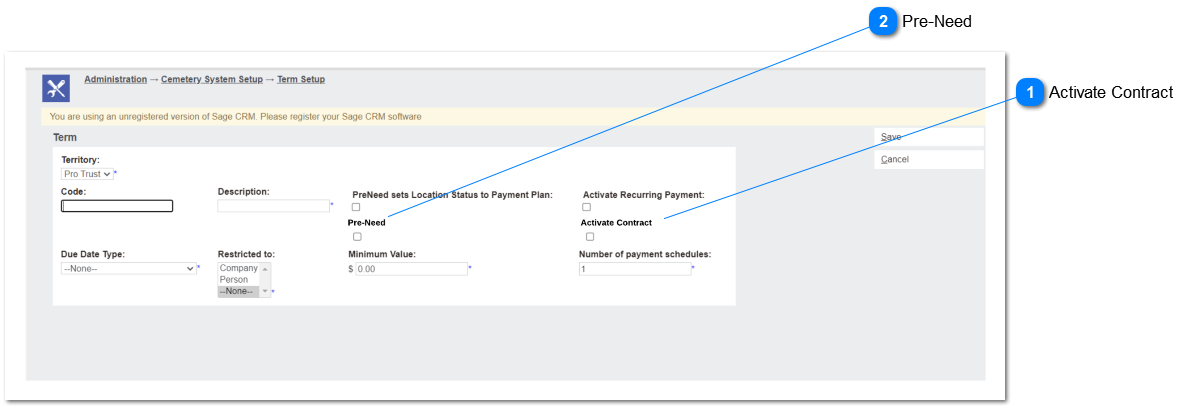
Activate Contract

 
Type
Notes
Rules
Compulsory
Placeholder
Format
Edit
Size
Default
Messages
Checkbox
This functionality will allow the user to activate contract function based on the payment term.
 
 
If the Activate Contract = Y, Selecting the term code when creating a sales order will allow the user to Create Contract,
 
Fields related to contract option will be visible if the Contract is activated to term code.
 
Pre-condition:
Custom Configuration UseContract = Y
N
-
-
Y
-
Immediate payment method, activate contract - Y
-
2

Pre-Need

 
Type
Notes
Rules
Compulsory
Placeholder
Format
Edit
Size
Default
Messages
Checkbox
This functionality is setup payment term for pre-need invoice.
Selecting a payment term as pre-need will check the "Pre-Need" checkbox in the sales order header as 'Y'.
 
Will activate when creating a NEW Order Header record, after the Terms code is selected. Pre-Need checkbox will respond to terms code selected.
a. If terms code is cleared, Pre-Need sets back to N/Null.
 
If EDITING an existing Order Header record, and the user changes the terms code, will only apply if Pre-Need checkbox is N/Null.
N/NULL to Y is allowed
Y to N/NULL is NOT allowed.
N
-
-
Y
-
-
-
The online help was created with Dr.Explain