To properly display this page you need a browser with JavaScript support.
To facilitate purchase requisitions initiated within byondpro it will be necessary to understand which suppliers service the different sites, for which products and at what purchase price. This will be a sub-entity of the Item Master, with an independent search option, similar to Item Prices.
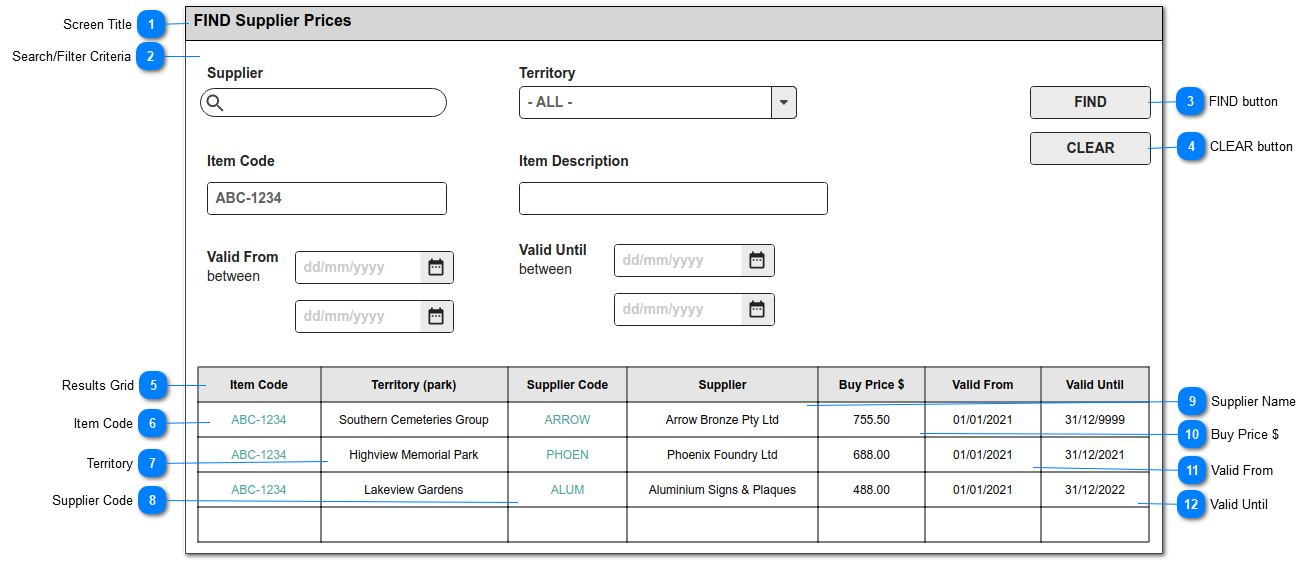
This screen allows users to search for existing Supplier Prices by item and supplier.
Screen Title
This is the screen title: FIND Supplier Prices
Type
Notes
Rules
Compulsory
Format
Edit
Size
Default
Error Message
Title
1. This screen / menu item in SEARCH is visible to users with CRM security rights to the Supplier Prices feature.
N
Search/Filter Criteria
The fields shown here will be provided as standard search criteria.
Type
Notes
Rules
Compulsory
Format
Edit
Size
Default
Error Message
Search Criteria
The fields listed will be stored standard with the Supplier Prices entries in byondpro.
SUPPLIER: search select to Company records, restricted to Type Supplier
TERRITORY: list of Territories
ITEM: text search to item/codes
ITEM DESCRIPTION: text search to item/description
VALID FROM: date search to Valid From field
VALID UNTIL: data search to Valid Until field
N
Y
FIND button
This is an action button to initiate a new search based on the filter criteria selected
Type
Notes
Rules
Compulsory
Format
Edit
Size
Default
Error Message
Button
1.Selecting the FIND button will initiate a search of the Supplier Price entries, filtered according to the selections made in (2).
2. Search results to be listed in the grid shown below.
3. Records will be based on the "AND" operation among the search filters.
N
CLEAR button
This is an action button to clear all search results
Type
Notes
Rules
Compulsory
Format
Edit
Size
Default
Error Message
Button
1. Selecting the CLEAR button, will clear all search parameter selections previously made in (2).
1a. Will empty the search results grid of previous results.
N
Results Grid
This is the list of search results, including (standard CRM) number of results found and page navigation objects.
Item Code
This is the Item Code for which the supplier buy price applies.
Type
Notes
Rules
Compulsory
Format
Edit
Size
Default
Error Message
string
Column header to be sortable
1. This column shows the Item Code.
2. Hyperlink to Item Summary screen
Y
hyperlink
N
Territory
This is the Territory for the which the supplier buy price applies
Type
Notes
Rules
Compulsory
Format
Edit
Size
Default
Error Message
string
Column header to be sortable
1. This column shows the Territory Name
Y
N
Supplier Code
This is the ERP system's code for the supplier / company record.
Type
Notes
Rules
Compulsory
Format
Edit
Size
Default
Error Message
string
Column header to be sortable
1. This column shows the Supplier Code.
2. Hyperlink to Company Summary screen
Y
hyperlink
N
Supplier Name
This is the name for the supplier/company record
Type
Notes
Rules
Compulsory
Format
Edit
Size
Default
Error Message
string
Column header to be sortable
1. This column shows the Supplier Name
Y
N
Buy Price $
This is the amount / buy price for the item
Type
Notes
Rules
Compulsory
Format
Edit
Size
Default
Error Message
numeric
Column header to be sortable
1. This column shows the Supplier Price.
Y
currency
N
Valid From
This is the starting date from which the supplier buy price applies.
Type
Notes
Rules
Compulsory
Format
Edit
Size
Default
Error Message
Date
Column header to be sortable
1. This column shows the Price Valid From date.
Y
N
Valid Until
This is the ending date for which the supplier buy price applies.
Type
Notes
Rules
Compulsory
Format
Edit
Size
Default
Error Message
Date
Column header to be sortable
1. This column shows the price Valid Until date.
Y
N