byondpro
Functional Specifications
×
Menu
Index

Sales Discounts

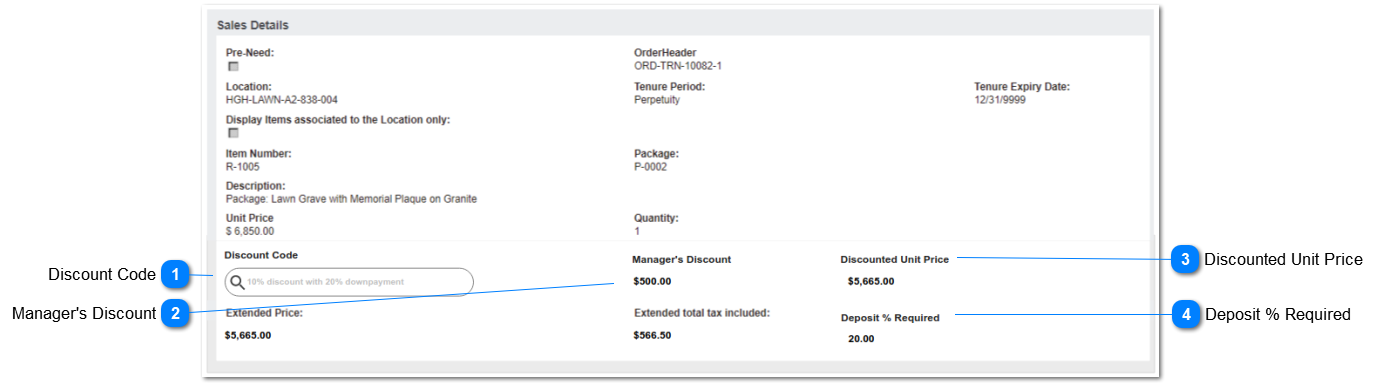
This screen describes the Discount fields displayed on the Order Details screen when the configuration "Discounts Apply" is activated.
 
Prerequisites:
1. Cemetery System Setup > Configuration: SalesDiscounts = Y
2. Users have edit rights to the Order Header and Order Details entities.
 
Note: the following functions in byondpro are based on the adjusted Extended Price (tax exclusive), and therefore unaffected by this Discounts feature:  Commissions and GL postings for financials and iMan integration.
 
Sales Discounts
1

Discount Code

 
This field allows the user to select the discount code to be applied to this line item.
 
Type
Notes
Rules
Compulsory
Format
Edit
Size
Default
Error Message
Search Advanced Select


2a: PRE-NEED = N/null
DISCOUNT APPLICABILITY options:
- At-Need
- Both
 
PRE-NEED = Y
DISCOUNT APPLICABILITY options:
- Pre-Need
- Both


4a. Calculation Example
Unit Price: $999.00
Discount:  5.55%
Discount:  $55.4445
Rounded to $55.44
Discounted Unit price:  $943.56
 
Extended Price:
943.56 x (Qty) 2 = $1,887.12
 
Extended Total Tax
943.56 x (Tax %) 0.1 = 94.356
Rounded to 94.36
94.36 x (Qty) 2 = $188.72
 
(above assumes tax is NOT included in unit price)
1. This is a lookup to the Discount Codes entity.
 
2. Allow search by Discount Code and Description,including wildcard %.
 
2a. Filter Discount Code selections dependent on Pre-Need field value on Order Details, and Discount Applicability field.
2b. Exclude Discount Codes where Active is N/null.
 
3. On selection, populate following field, with the value from the Discount entry:
DEPOSIT % REQUIRED.
  (this is for information only in this screen - will be used to calculate total deposit on Order Header.)
 
4. On selection, perform following field calculations, using DISCOUNT % on the Discount entry.
4a. Calculated $ discount to be rounded to 2 decimals.  Refer example in Notes
4b. DISCOUNTED UNIT PRICE: Unit Price minus $ discount amount (rounded to 2 decimals)
4c. EXTENDED PRICE: Discounted Unit Price * Quantity
4d. EXTENDED TOTAL TAX INCLUDED: Tax % calculations on Discounted Unit Price * quantity
 
5. While in new/edit mode, if the discount code is removed:
5a. clear the data value in the following field:
DEPOSIT % REQUIRED
5b. Recalculate the following fields:
DISCOUNTED UNIT PRICE: Unit Price minus Manager's Discount
EXTENDED PRICE: Discounted Unit Price * Quantity
EXTENDED TOTAL TAX INCLUDED: Tax % calculations on Discounted Unit Price * Quantity
 
6. While in new/edit mode, if the Item code is removed:
6a. clear the data value in the following fields:
DISCOUNT CODE
DISCOUNTED UNIT PRICE
MANAGER'S DISCOUNT
EXTENDED PRICE
EXTENDED TOTAL TAX INCLUDED
DEPOSIT % REQUIRED
 
7. While in new/edit mode, if the PRE-NEED value is changed:
7a. Validate Discount Applicability value on Discount Code.
7b. If value remains valid for the changed pre-need field selection, no action required.
7c. If value conflicts with pre-need field selection, display error message.
7d. If user selects OK: Clear the Discount Code and perform actions 5a, 5b.
7e. If user selects CANCEL: change Pre-Need field value to opposite of current, i.e.
if Y/checked - set to NULL/cleared
if N/NULL - set to Y/checked
 
When adding new or editing existing Order Detail records, after selection of ITEM code, auto-insert DISCOUNT CODE if the following criteria are met:
8a. Order Header Bill-To Company <> null
8b. Company Default Discount Code <> null
8c. Discount Code meets Item/Category and Site requirements.
8d. Perform calculations per 4) & field updates per 3) above
N
 
Y
 
 
6c. The Discount Code [XXX code] conflicts with the Pre-Need setting change.
Select OK to clear the Discount Code field.
Select CANCEL to reset the pre-need value.
2

Manager's Discount

 
This field is used to apply a $ discount amount. It can be used in conjunction with a Discount Code (%) or stand-alone as the only discount entered. It is available only to users with the security right: Allowed to Edit Prices.
 
Type
Notes
Rules
Compulsory
Format
Edit
Size
Default
Error Message
Numeric


4a. Calculation Example
Unit Price: $999.00
Discount:  5.55%
Discount:  $55.4445
Rounded to $55.44
 
Manager's Discount: $100.00
 
Discounted Unit price:  $843.56
999.00 - 55.44 - 100.00
1. This field is set to read-only, unless the user has the right to Edit Prices, on their User profile.
 
2. This field accepts positive and negative values.
2a. The amount entered is minus'd from the Unit Price. 
e.g.   $100 minus  10 = $90.00
e.g.   $100 minus  -10 = $110.00
 
3. The amount entered is used to calculate the DISCOUNTED UNIT PRICE.
 
DISCOUNTED UNIT PRICE = Unit Price minus DISCOUNT % (calculated amount)
minus MANAGER'S DISCOUNT
N
Currency
Y
 
0.00
 
3

Discounted Unit Price

 
This field shows the adjusted unit price, after the % Discount and the Manager's Discount have been applied.
 
Type
Notes
Rules
Compulsory
Format
Edit
Size
Default
Error Message
numeric
 
1. This field is read-only for all users, with the value resulting from calculations described in 1) and 2) above.
Y
currency
N
 
= unit price
 
4

Deposit % Required

 
This field is used to calculate the total deposit on the order header.
 
Type
Notes
Rules
Compulsory
Format
Edit
Size
Default
Error Message
numeric
This is for information only in this screen - will be used to calculate total deposit on Order Header.
1. This field is read-only for all users.
 
2. On selection of the Discount Code, it is populated with the value from the Discount entry:  DEPOSIT % REQUIRED.
  
N
 
N


The online help was created with Dr.Explain