byondpro
Functional Specifications
×
Menu
Index

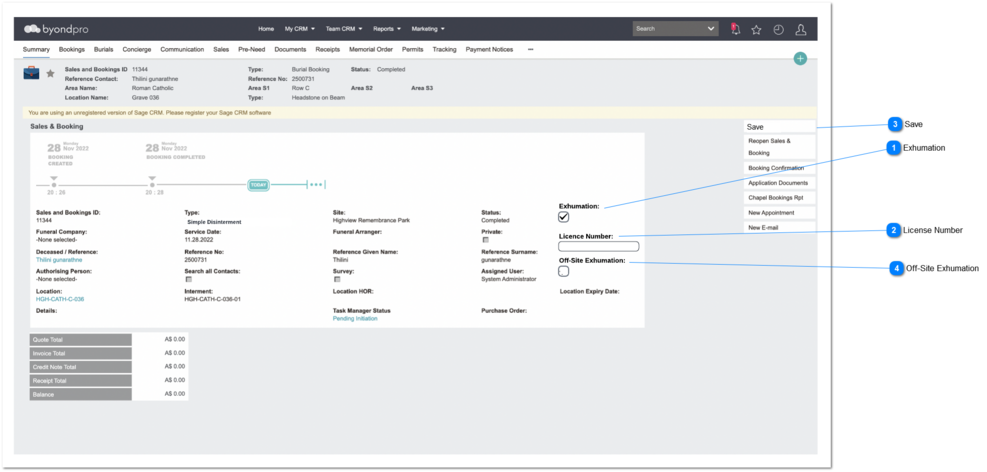
Sales & Booking - Disinterment Booking Creation

Overview


Sales & Booking - Disinterment Booking Creation
1

Exhumation

Type
Notes
Rules
Compulsory
Placeholder
Format
Edit
Size
Default
Messages
Check box
1. Existing Exhumation checkbox in S&B module -> Booking tab -> Exhumation Checkbox will remove & move to summary tab.
Pre Condition:
1. Only if the Type = Disinterment Booking, this field will ticked automatically.
Yes
-
-
-
-
Should be ticked
-
2

License Number

Type
Notes
Rules
Compulsory
Placeholder
Format
Edit
Size
Default
Messages
Text Field
-
Pre Condition:
1. Only if the Type = Disinterment Booking, this field will enable.
Yes
-
-
-
-
-
-
3

Save

Type
Notes
Rules
Compulsory
Placeholder
Format
Edit
Size
Default
Messages
Button
-
1. If the Exhumation checkbox = Yes, then upon the S&B status Completion, system will create the disinterment  record automatically and update other related modules automatically.
-
-
-
-
-
-
-
4

Off-Site Exhumation

Type
Notes
Rules
Compulsory
Placeholder
Format
Edit
Size
Default
Messages
Check box
-
1. If Off-Site Exhumation = Yes, then create the interment record automatically on designated exhumation location.
1a. The designated exhumation location is stored in Sales & Booking Disinterment Configuration, with the name of DefaultExhumationLocationCode and value = [Site Code | Location Code].
  • Need to match SITE of the S&B with SITE in the rule.
  • Need to create interment records against specified LOCATION.
-
-
-
-
-
Should be Un-ticked
-
 
The online help was created with Dr.Explain