byondpro
Functional Specifications
×
Menu
Index

Receipts

 
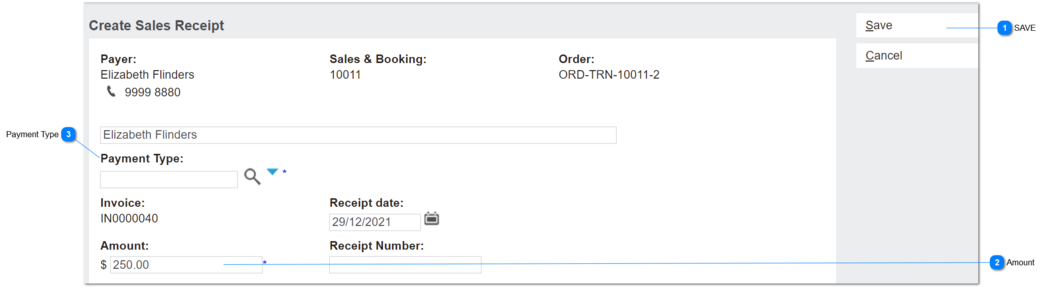
This screen is used to record payments from customers and associate to the debtor account, sales & booking ID and invoice transaction.
Receipts screen viewed from Sales & Booking/Receipts tab header
 
Receipts
1

SAVE

 
July-2021.
Added control to disable Save if Amount owing on invoice = $0
Applies to Create New Receipt screens on order header and S&B/Receipts tab.
If an installment in repayment plan is paid/ partially paid from a Manual Receipt, payment link already sent along with payment notice should be invalided and if there any balance repayment payment amount due, new payment notice needed to be sent with recalculated outstanding amount.
2

Amount

 
This field shows the balance of the invoice outstanding.
Dec-21:  update for release with new Sales Discount feature to insert Deposit Required on first instalment.
Feb - 23 - Update for release recurring payment to adjust amount outstanding considering credit note
 
Type
Notes
Rules
Compulsory
Format
Edit
Size
Default
Error Message
numeric
This applies to the New receipt screen opened from the Order Header screen.
 
All existing conditions apply, except where stated in Rules.
 
1. On NEW Receipt screen, validate whether:
Order Header/Deposit Required field > $0
AND
Oustanding Invoice Balance = Order Total.
a. If true, insert Deposit Required amount.
b. If false, auto-insert the calculated amount outstanding for the invoice (per current)
 
Formula to calculate amount outstanding will be as follows;
Amount due = Repayment Amount - Paid Amount (Receipt Amount + Credit Note Amount)
 
System will not allow to the raise receipt exceeding the amount due from the invoice value and It will also apply to contract and other payment terms
Y
currency
Y


3

Payment Type

 
June - 23 - Remove Online payment option from payment type
 
Type
Notes
Rules
Compulsory
Format
Edit
Size
Default
Error Message
Advance Search
This field will allow the user advance select the payment methods
This will list all the payment types configured in term setup except payment methods with opuspay/ Online Payments
Y
 
Y


The online help was created with Dr.Explain