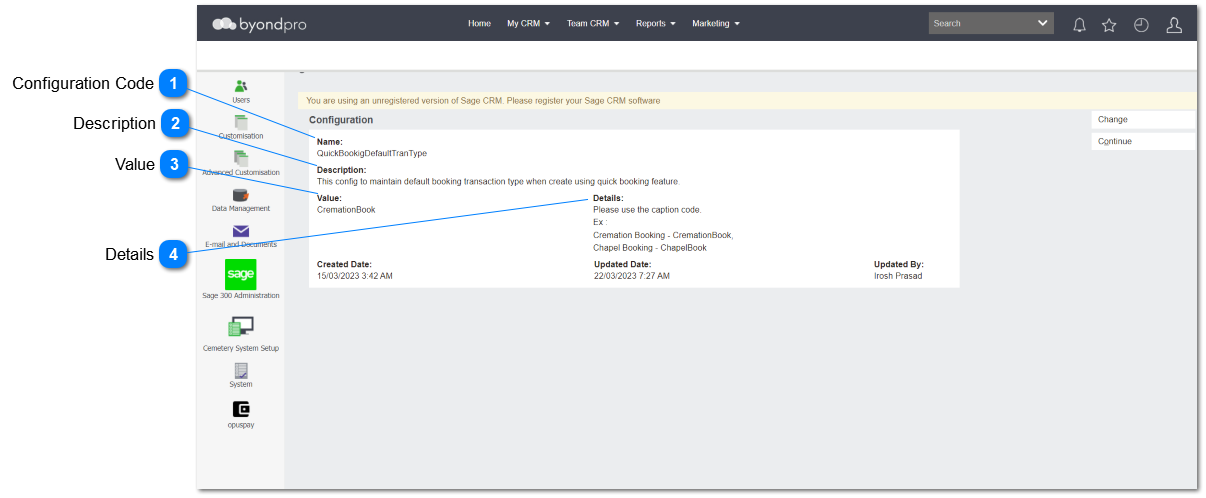
Quick Booking Default Transaction Type
This section is added to implement the configuration to maintain defualt booking transaction type when create using quick booking feature.
 Configuration Code
|
Type
|
Notes
|
Rules
|
Compulsory
|
Placeholder
|
Format
|
Edit
|
Size
|
Default
|
Messages
|
|
Text
|
-
|
-
Any characters including numbers, letters and special characters can be entered.
-
The entered value will be
QuickBookingDefaultTranType.
3. IF the user clicks on the save button, WITHOUT entering a text/ value, the red arrow should be shown as per existing functionality.
|
Yes
|
-
|
Text
|
Yes
|
-
|
-
|
-
| |
|
 Description
|
Type
|
Notes
|
Rules
|
Compulsory
|
Placeholder
|
Format
|
Edit
|
Size
|
Default
|
Messages
|
|
Text
|
-
|
1. This allows to enter any characters including numbers, letters and special characters.
2. The entered value will be:
This config to maintain default booking transaction type when create using quick booking feature.
3. As this is an optional field, the user will be able to leave this field blank/ empty.
|
Optional
|
-
|
Text
|
Yes
|
-
|
-
|
-
| |
|
 Value
|
Type
|
Notes
|
Rules
|
Compulsory
|
Format
|
Edit
|
Size
|
Default
|
Error Message
|
|
Text
|
|
This allows to enter any characters including numbers, letters and special characters.
1. If CremationBook - default booking type will be Cremation Booking
2. If ChapelBook - default booking type will be Chapel Booking
As this is an optional field, the user will be able to leave this field blank/ empty.
|
Yes
|
|
Yes
|
|
N/null
|
| |
|
 Details
|
Type
|
Notes
|
Rules
|
Compulsory
|
Placeholder
|
Format
|
Edit
|
Size
|
Default
|
Messages
|
|
Multi line Text
|
-
|
1. This allows to enter any characters including numbers, letters and special characters.
2. The entered value will be;
Please use the caption code.
Ex :
Cremation Booking - CremationBook,
Chapel Booking - ChapelBook
3. As this is an optional field, the user will be able to leave this field blank/ empty.
|
Optional
|
-
|
Text
|
Yes
|
-
|
-
|
-
| |
|