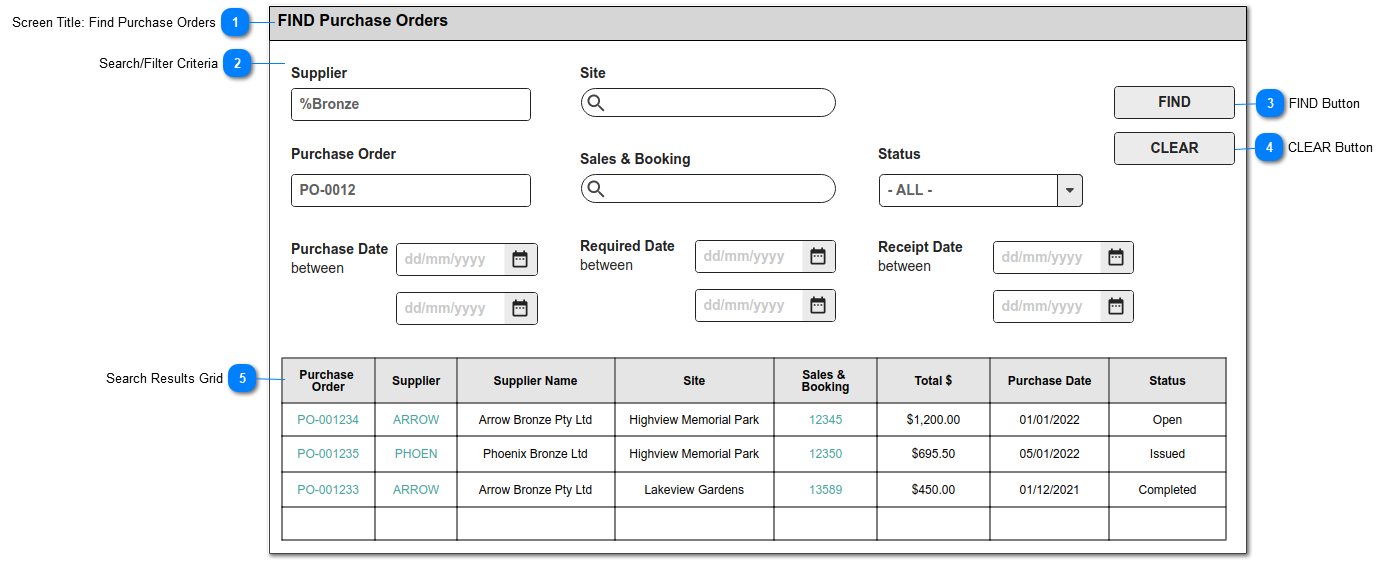
This FIND screen allows users to search for existing Purchase Orders.
It is accessed under the SEARCH menu.
 Screen Title: Find Purchase Orders
This is the screen title: FIND Purchase Orders
|
Type
|
Notes
|
Rules
|
Compulsory
|
Format
|
Edit
|
Size
|
Default
|
Error Message
|
|
Title
|
|
1. This screen / menu item in SEARCH is visible to users with CRM security rights to the Purchase Orders module.
|
N
|
|
|
|
|
| |
|
 Search/Filter Criteria
The fields shown here will be provided as standard search criteria.
|
Type
|
Notes
|
Rules
|
Compulsory
|
Format
|
Edit
|
Size
|
Default
|
Error Message
|
|
Search Criteria
|
The fields listed will be stored standard with the Purchase Order entries in byondpro.
|
SUPPLIER: search select to Company records, restricted to Type Supplier
SITE: search select to Site records
PURCHASE ORDER: text search to Purchase Order Numbers
SALES & BOOKING: search select to Sales & Booking records
STATUS: selection list of Purchase Order Status
PURCHASE DATE: date search to Purchase Date
REQUIRED DATE: date search to Required Date
RECEIPT DATE: date search to Receipt Date
|
N
|
|
Y
|
|
|
| |
|
 FIND Button
This is an action button to initiate a new search based on the filter criteria selected
|
Type
|
Notes
|
Rules
|
Compulsory
|
Format
|
Edit
|
Size
|
Default
|
Error Message
|
|
Button
|
|
1.Selecting the FIND button will initiate a search of the Purchase Order entries, filtered according to the selections made in (2).
2. Search results to be listed in the grid shown below.
3. Records will be based on the "AND" operation among the search filters.
|
N
|
|
|
|
|
| |
|
 CLEAR Button
This is an action button to clear all search results
|
Type
|
Notes
|
Rules
|
Compulsory
|
Format
|
Edit
|
Size
|
Default
|
Error Message
|
|
Button
|
|
1. Selecting the CLEAR button, will clear all search parameter selections previously made in (2).
1a. Will empty the search results grid of previous results.
|
N
|
|
|
|
|
| |
|
 Search Results Grid
This is the list of search results, including standard CRM number of results found and page navigation objects.
All column headers are to be sortable.
The following column results are to be included:
|
Column
|
Display Rules
|
|
Purchase Order
|
display Purchase Order Number
hyperlink to Purchase Order Header summary screen, view mode
|
|
Supplier
|
display Supplier ERP Code [comp_VendorID]
hyperlink to Company summary screen, view mode
|
|
Supplier Name
|
Company Name
|
|
Site
|
Site Name
|
|
Sales & Booking
|
display Sales & Booking ID
hyperlink to Sales & Booking summary screen, view mode
|
|
Total $
|
display Purchase Order Total
|
|
Purchase Date
|
display Purchase Date
|
|
Status
|
display Purchase Order Status
| |
|