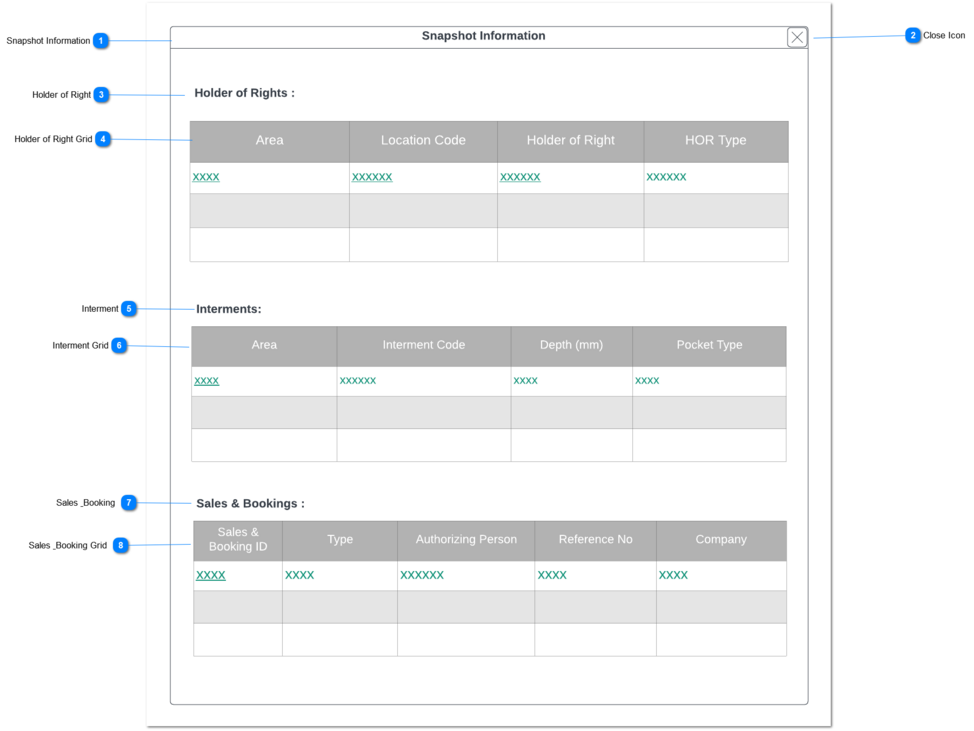
Person - Snapshot Information
This screen will show a snapshot of significant information in a pop-up window (or side panel) in the person's screen.
 Snapshot Information
|
Type
|
Notes
|
Rules
|
Compulsory
|
Placeholder
|
Format
|
Edit
|
Size
|
Default
|
Messages
|
|
Pop-up Window
Header
|
-
|
1. Person's module quick information
need to load in a pop-up window.
|
-
|
-
|
-
|
-
|
-
|
-
|
-
| |
|
 Close Icon
|
Type
|
Notes
|
Rules
|
Compulsory
|
Placeholder
|
Format
|
Edit
|
Size
|
Default
|
Messages
|
|
Button
|
-
|
1. Upon the clicking, the user will be navigated back to the Person screen of the byondpro.
|
-
|
-
|
-
|
-
|
-
|
-
|
-
| |
|
 Holder of Right
|
Type
|
Notes
|
Rules
|
Compulsory
|
Placeholder
|
Format
|
Edit
|
Size
|
Default
|
Messages
|
|
Read only text
|
1. Title of the section header
|
-
|
-
|
-
|
Text
|
-
|
-
|
-
|
-
| |
|
 Holder of Right Grid
|
Type
|
Notes
|
Rules
|
Compulsory
|
Placeholder
|
Format
|
Edit
|
Size
|
Default
|
Messages
|
|
Column Header
|
Area
|
1.Area selected in the Location Summary screen will be displayed.
1a. hyperlink to Area record
|
-
|
-
|
-
|
-
|
-
|
-
|
-
|
|
Column Header
|
Location Code
|
1a. hyperlink to Location record
|
-
|
-
|
-
|
-
|
-
|
-
|
-
|
|
Column Header
|
Holder of Right
|
|
-
|
-
|
-
|
-
|
-
|
-
|
-
|
|
Column Header
|
HOR Type
|
|
-
|
-
|
-
|
-
|
-
|
-
|
-
| |
|
 Interment
|
Type
|
Notes
|
Rules
|
Compulsory
|
Placeholder
|
Format
|
Edit
|
Size
|
Default
|
Messages
|
|
Read only text
|
1. Title of the section header
|
-
|
-
|
-
|
Text
|
-
|
-
|
-
|
-
| |
|
 Interment Grid
|
Type
|
Notes
|
Rules
|
Compulsory
|
Placeholder
|
Format
|
Edit
|
Size
|
Default
|
Messages
|
|
Column Header
|
Area
|
1.Area selected in the Location Summary > Interment Tab screen will be displayed.
|
-
|
-
|
-
|
-
|
-
|
-
|
-
|
|
Column Header
|
Interment Code
|
1.Interment Code selected in the Location Summary > Interment Tab screen will be displayed.
1a. hyperlink to the interment record
|
-
|
-
|
-
|
-
|
-
|
-
|
-
|
|
Column Header
|
Depth (mm)
|
1.Depth (mm) selected in the Location Summary > Interment Tab screen will be displayed.
|
-
|
-
|
-
|
-
|
-
|
-
|
-
|
|
Column Header
|
Pocket Type
|
1.Pocket Type selected in the Location Summary > Interment Tab screen will be displayed.
|
-
|
-
|
-
|
-
|
-
|
-
|
-
| |
|
 Sales & Booking
|
Type
|
Notes
|
Rules
|
Compulsory
|
Placeholder
|
Format
|
Edit
|
Size
|
Default
|
Messages
|
|
Read only text
|
1. Title of the section header
|
-
|
-
|
-
|
Text
|
-
|
-
|
-
|
-
| |
|
 Sales & Booking Grid
|
Type
|
Notes
|
Rules
|
Compulsory
|
Placeholder
|
Format
|
Edit
|
Size
|
Default
|
Messages
|
|
Column Header
|
Sales & Booking ID
|
1.Sales & Booking ID selected in the Location Summary > Sales & Booking Tab screen will be displayed.
1a. hyperlink to the S&B record
|
-
|
-
|
-
|
-
|
-
|
-
|
-
|
|
Column Header
|
Type
|
1.Type selected in the Location Summary > Sales & Booking Tab screen will be displayed.
|
-
|
-
|
-
|
-
|
-
|
-
|
-
|
|
Column Header
|
Authorizing Person
|
1.Authorizing Person selected in the Location Summary > Sales & Booking Tab screen will be displayed.
1a. hyperlink to the person record
|
-
|
-
|
-
|
-
|
-
|
-
|
-
|
|
Column Header
|
Reference No
|
1.Reference No selected in the Location Summary > Sales & Booking Tab screen will be displayed.
1a. hyperlink to the person record
|
-
|
-
|
-
|
-
|
-
|
-
|
-
|
|
Column Header
|
Company
|
1.Funeral Company selected in the Location Summary > Sales & Booking Tab screen will be displayed.
1a. hyperlink to the company record
|
-
|
-
|
-
|
-
|
-
|
-
|
-
| |
|