byondpro
Functional Specifications
×
Menu
Index

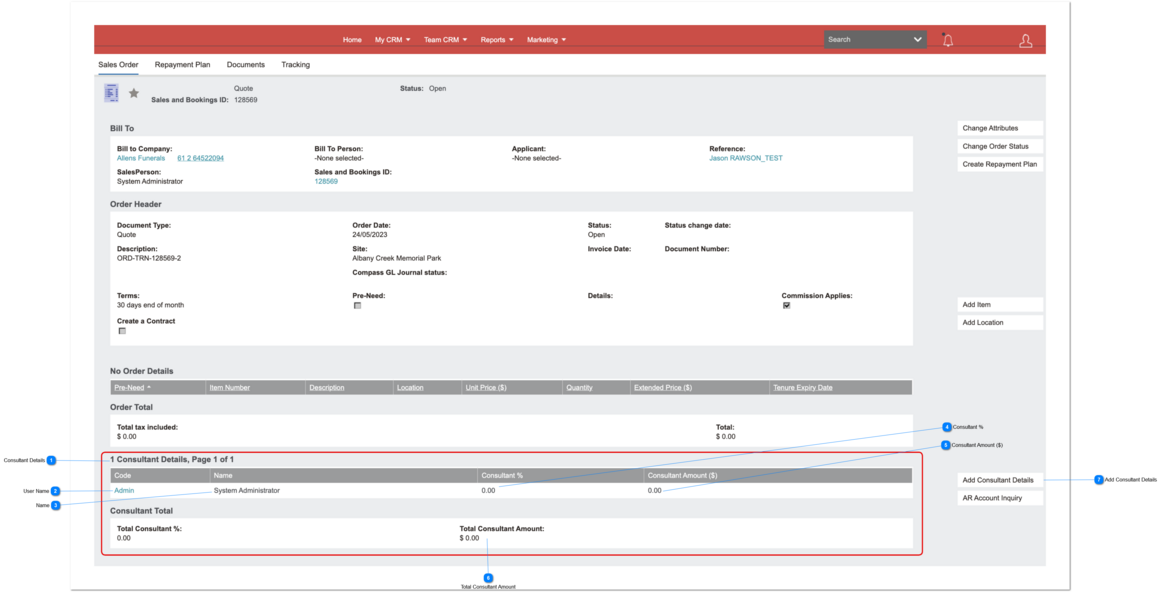
Order Header: Commission Details

 
This feature is a screen component attached to the Order Header record.
It allows salesperson commissions to be shared between multiple users according to a user-defined % split.
 
Order Header: Commission Details
1

Consultant Details

 
This is the Commission Detail screen section showing breakdown of commission earned by salesperson.
It's positioned at the bottom of the Sales Order (header) screen.
 
Type
Notes
Rules
Compulsory
Placeholder
Format
Edit
Size
Default
Messages
Screen Header
This populates the grid automatically with the primary salesperson, showing 100% allocation to that user by default.
1. If Configuration: CommShare = N/null, do not show this screen section.
 
2. If Configuration: CommShare = Y, show this screen section.
2a. auto-insert entry 1 with following details:
User:  Salesperson named on the Order Header: orhe_ownerid
Percentage:  100
Amount:  Sales Commission $ Earned.
N
-
-
N
-
-
-
2

User Name

 
This is the login UserName for the salesperson.
 
Type
Notes
Rules
Compulsory
Placeholder
Format
Edit
Size
Default
Messages
Text
User_Logon
1. Display: User_Logon
 
2. Hyperlink to open the Commission Detail record.
Y
-
-
N
-
-
-
3

Name

 
This is the full name of the salesperson.
 
Type
Notes
Rules
Compulsory
Placeholder
Format
Edit
Size
Default
Messages
Text
 
1. Display: user_firstname + " " + user_lastname.
N
-
-
N
-
-
-
4

Consultant %

 
 This is the % of Salesperson commission allocated to the salesperson.
 
Type
Notes
Rules
Compulsory
Placeholder
Format
Edit
Size
Default
Messages
Numeric
 
1. Display to 2 decimals, right-aligned.
Y
-
-
N
-
-
-
5

Consultant Amount ($)

 
This is the calculated amount of commission earned by the salesperson.
 
Type
Notes
Rules
Compulsory
Placeholder
Format
Edit
Size
Default
Messages
Numeric
 
1. Column header name:  Amount ([system currency symbol])
 
2. Display to 2 decimals, right-aligned
2a. Rounding differences should be applied to the last entry in the list; i.e. when the sum of % allocated = 100, any amount variances (cents)
Y
-
-
N
-
-
-
6

Total Consultant Amount

 
This is a Totals row showing the total $ amount of commission earned and the sum of commission % allocated.
The Sales Commissioned Earned on the order will display on screen, together with the Commission Amount distributed. This is a visual reference to the user assigning commission amounts.
 
Type
Notes
Rules
Compulsory
Placeholder
Format
Edit
Size
Default
Messages
Numeric
Before invoices are posted, the following must apply:
1. Sum of Commission % = 100
therefore
Sales Commission $ Earned =
Sum of Commission Distributed.
 
2. applies equally to Sales Orders Quote and (unposted) Credit Notes
1. Sum of Commission %
This is the total of commission % allocated to salesperson/s.
 
2. Sales Commission $ earned
This is the total of salesperson commission earned, calculated from the Order Detail lines.
 
3. Sum of Commission distributed  (not pictured)
This is the total of commission $ amounts allocated to salesperson/s
 
4. Commission amounts are subject to change while the Quote is in progress, and line items are added, edited or deleted. Therefore commission entries must recalculate as Order Details are Saved.
Y
-
-
N
-
-
-
7

Add Consultant Details

 
This is an action button to open the new Commission Details entry screen
 
Type
Notes
Rules
Compulsory
Placeholder
Format
Edit
Size
Default
Messages
Button
 
1. If Configuration: CommShare = N/null, do not show this button
2. Opens a new Commission Detail entry screen.
N
-
-
N
-
-
-
The online help was created with Dr.Explain