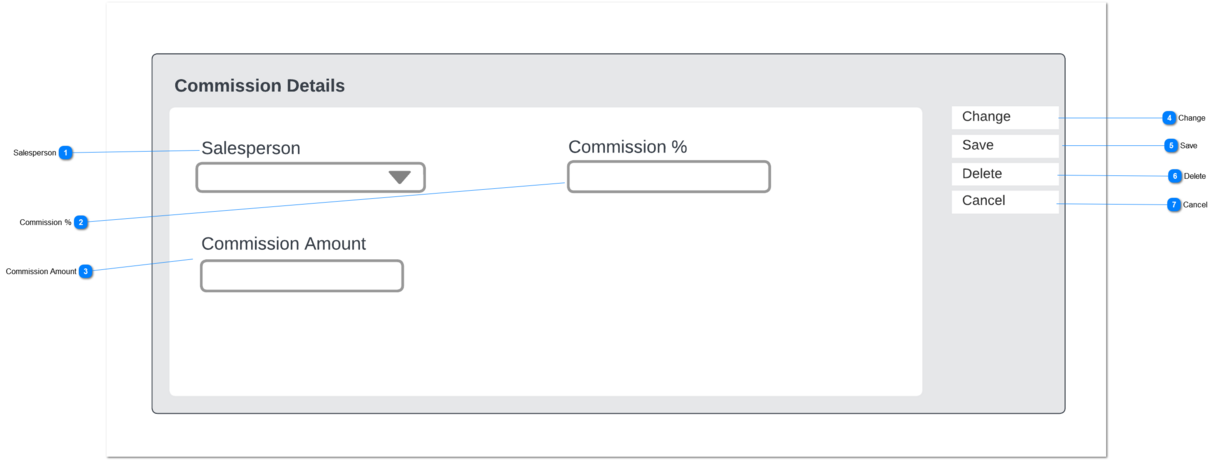
This Commission Detail screen is used to add/remove sales staff from the commission sharing table.
 Salesperson
This is a lookup to the list of users in byondpro, restricted to those who are configured to earn commission.
|
Type
|
Notes
|
Rules
|
Compulsory
|
Placeholder
|
Format
|
Edit
|
Size
|
Default
|
Messages
|
|
Search Advanced Select
|
|
1. Lookup to the list of users.
1a. Filtered to users with the EARNS COMMISSION control on the user profile. [user_earncommission = Y]
|
Y
|
-
|
-
|
Y
|
-
|
-
|
-
| |
|
 Commission %
This is the % of commission to be allocated to this salesperson.
|
Type
|
Notes
|
Rules
|
Compulsory
|
Placeholder
|
Format
|
Edit
|
Size
|
Default
|
Messages
|
|
Numeric
|
Example calculation:
Sales Commission: 507.50
Commission %: 4.50
Commission Amount: 22.8375
Rounded: $22.84
|
1. This field accepts only positive amounts, i.e. >0
2. When the user "tabs-off" this field,
2a. validate total % distributed for this order header is <= 100.
2b. if true - proceed to 3).
2c. if > 100, show error message.
2d. Return cursor to Commission Percentage field
3. Calculate the commission earned and update Commission Amount field.
3b. Calculation:
Commission Earned $ (total from order detail lines) *
Commission %, rounded to 2 decimals.
|
Y
|
-
|
02 decimals
|
Y
|
-
|
0.00
|
2c. Total commission now exceeds 100%. Please revise Commission Percentage.
| |
|
 Commission Amount
This is the calculated amount of commission allocated to the salesperson.
|
Type
|
Notes
|
Rules
|
Compulsory
|
Placeholder
|
Format
|
Edit
|
Size
|
Default
|
Messages
|
|
Numeric
|
This field is read only in the UI
|
1. Displays the Amount calculated by the Commission % field (2).
|
Y
|
-
|
02 decimals
|
N
|
-
|
0.00
|
-
| |
|
 Change
This is an action button to put an existing summary record into edit mode.
|
Type
|
Notes
|
Rules
|
Compulsory
|
Placeholder
|
Format
|
Edit
|
Size
|
Default
|
Messages
|
|
Button
|
Subject to all standard CRM rules.
|
1.This Button is visible when the screen is in VIEW mode.
2. Selection places the screen into edit mode
|
N
|
-
|
-
|
-
|
-
|
-
|
-
| |
|
 Save
|
Type
|
Notes
|
Rules
|
Compulsory
|
Placeholder
|
Format
|
Edit
|
Size
|
Default
|
Messages
|
|
Button
|
Subject to all standard CRM rules.
|
1.This Button is visible when the screen is in NEW or EDIT mode.
2. When selected:
2a. New entries are inserted to the database.
2b. Edited entries are updated in the database.
|
N
|
-
|
-
|
-
|
-
|
-
|
-
| |
|
 Delete
|
Type
|
Notes
|
Rules
|
Compulsory
|
Placeholder
|
Format
|
Edit
|
Size
|
Default
|
Messages
|
|
Button
|
Subject to all standard CRM rules.
|
1.This Button is visible when the screen is in EDIT mode.
2. When selected, the user is prompted with standard CRM warning, and options to proceed or cancel.
3. The record is soft-deleted in the database.
|
N
|
-
|
-
|
-
|
-
|
-
|
-
| |
|
 Cancel
|
Type
|
Notes
|
Rules
|
Compulsory
|
Placeholder
|
Format
|
Edit
|
Size
|
Default
|
Messages
|
|
Button
|
Subject to all standard CRM rules.
|
1. This button is visible when the screen is in NEW/EDIT mode.
2. When selected, returns the user to the Order summary screen.
|
N
|
-
|
-
|
-
|
-
|
-
|
-
| |
|