To properly display this page you need a browser with JavaScript support.
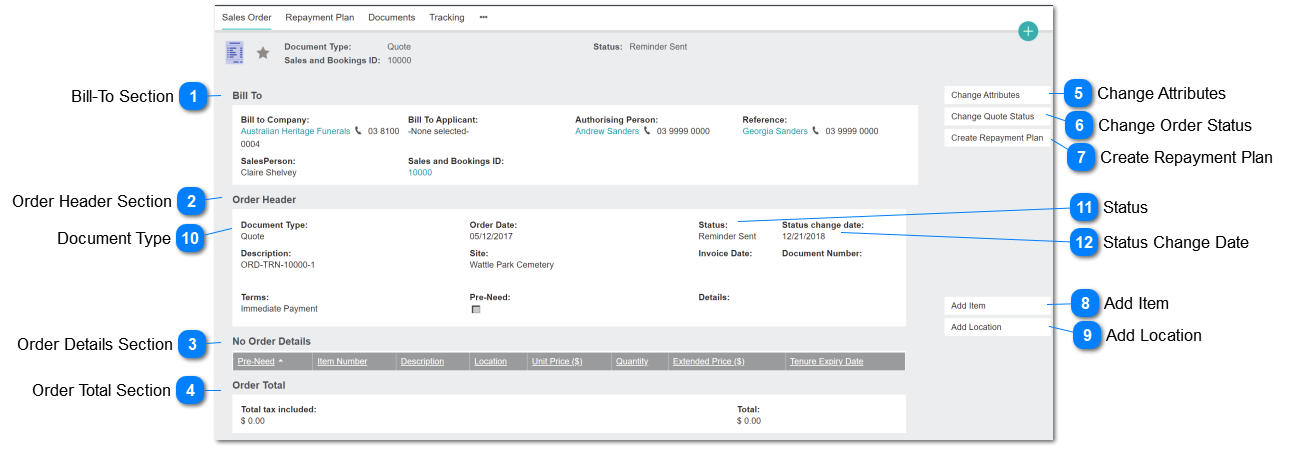
Bill-To Section
This section of the screen controls Bill-to parties and person record associations.
Order Header Section
This section of the screen controls document attributes: type, date, numbers, conditions.
Order Details Section
This section of the screen shows in summary format the items and prices selected. Refer Order Details
Order Total Section
This section of the screen summarises the amount for each line item, showing order and tax totals
Change Attributes
This button places the Bill-to and Order Header sections of the screen into edit mode.
Change Order Status
This button changes the Order Header/Status field.
Type
Notes
Rules
Compulsory
Format
Edit
Size
Default
Error Message
Button
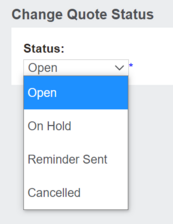
A. Quote Status selection list options for end user selection:
On Hold
Cancelled
Options not displayed to end user:
Invoiced (invoices)
1. Display this button for Order Types: Quote and Credit Note
2. If selected, open screen with selection list (per Note A and screen shot below)
3. If user selects "Cancelled", total must be EXCLUDED from S&B financial summary . Refer order types/status specifications.
4. On save, update Status field
5. On save, update Status Change Date: insert current date
N
Button
Create Repayment Plan
This button initiates the calculation of order/invoice repayment instalments, in accordance with the Terms code selected. Refer Repayment Schedule screen.
Add Item
This button opens the Order Details screen in non-ROI (Location) mode.
Add Location
This button opens the Order Details in ROI / Location selection mode.
Document Type
This field allows the user to switch the order mode from Quote to Credit Note.
Type
Notes
Rules
Compulsory
Format
Edit
Size
Default
Error Message
List
Selection List options:
- Quote
- Credit Note
- Invoice *
* not offered to user for selection. Set programmatically
1. Defaults to Quote
2. If user selects Credit Note, Order header changes to include following fields:
- Credit Note Invoice Number
- Reason for Credit Note
Y
String
Y
Quote
Status
This field shows the order status: whether open, posted or reminders sent for quotes.
Status Change Date
This field shows the last date that an open order was edited.