Order Details: Enforce Tax Class
This function refers to the Tax Over-Ride setting on the Company record.
If active, then the default tax setting for the Company will be applied to all Order Detail lines.
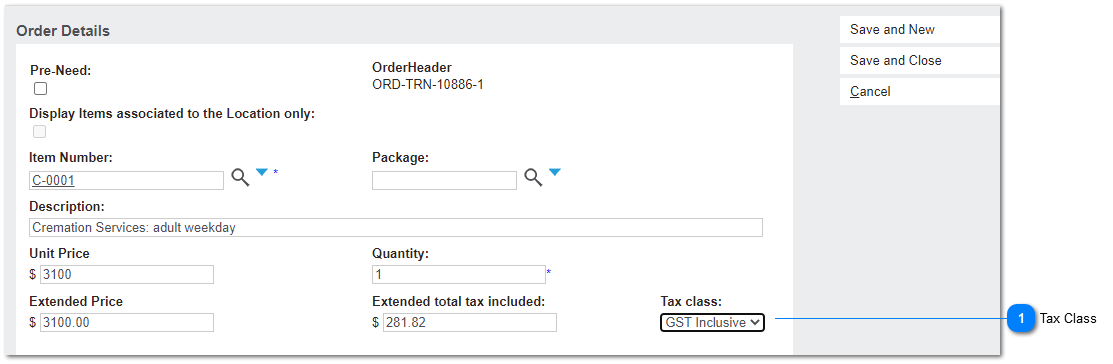
 Tax Class
The Tax Class determines whether a line item is subject to tax.
The Tax Class takes its setting from the Item Number >> Tax Code >> Tax Class.
This feature introduces an over-ride if the Bill-To Company ENFORCE TAX GROUP ON SALES is active, and sets the Tax Class per the Company settings.
|
Type
|
Notes
|
Rules
|
Compulsory
|
Format
|
Edit
|
Size
|
Default
|
Error Message
|
|
Selection List
|
orde_TaxClass
Fixed field values apply:
1. Taxable
3. Not-Taxable
9. Not Subject to Tax
|
1. This field is read-only; non-editable by the end user through the UI.
2. The Tax Class is derived from the Tax code and matches: itax_TaxClass
3. If Bill-To Company on the Order Header is null, existing rules apply. That is, Tax Class is derived from Tax Group on the Item Number: item_Tax
4. If Bill-To Company on the Order Header is not null, check Company: Enforce Tax Group on Sales.
4a. if N/null then Tax Class is derived from Item Number.
4b. If Y, then Tax Class is derived from Company Tax Group setting. comp_CodeTaxGrp
|
Y
|
|
N
|
|
N/null
|
| |
|
