byondpro
Functional Specifications
×
Menu
Index

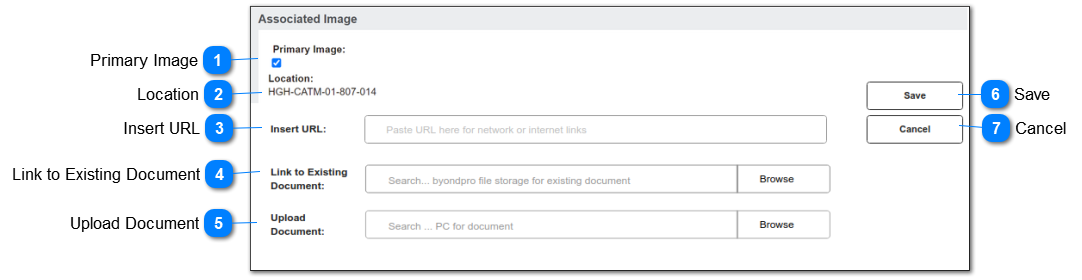
New Associated Image

 
This feature allows the user to enter (paste) a URL to a third-party file repository.
July 2021: updates will incorporate 2 new features:
1. ability to browse byondpro S3 Associated Images Directory and link to an existing document
2. ability to upload a document to the byondpro S3 Associated Images Directory
 
New Associated Image
1

Primary Image

 
This is the indicator that the image selected should be shown as the "location thumbnail" on the Location summary screen and for mapping.
 
Type
Notes
Rules
Compulsory
Format
Edit
Size
Default
Error Message
Checkbox
 
1. If Configuration: UseLocationAssoicatedImage = N/null, then this field is read only.
 
2. If Configuration: UseLocationAssoicatedImage = Y, then this field is editable.
 
3. If set to Y, and file type is an image file  (png, jpg, bmp) display on Location summary screen, and use for mapping thumbnail image.
3a. If an existing entry in the list is set to Y, set this field to read only.
3b. If more than 1 entry in the database is set to Y, use first image for display purposes.
No
 
Subject to conditions 1), 2) and 3a)


2

Location

 
This is the location code of the parent record.
 
Type
Notes
Rules
Compulsory
Format
Edit
Size
Default
Error Message
Text
 
1. Auto-insert location code of the parent record.
2. Read-only display purposes
 
 
N


3

Insert URL

 
This is the existing field/function that allows a user to enter (paste) the URL of a third-party network address, to establish a document display link with the Location.
 
Type
Notes
Rules
Compulsory
Format
Edit
Size
Default
Error Message
Text
 
1. per existing functionality
 
2. Set to read-only if user makes a file selection in #4 or #5.
N
string
Y
Subject to 2)


4

Link to Existing Document

 
This allows the user to browse to the byondpro S3 Associated Image folder repository and select an existing document to be linked to the Location.
 
Type
Notes
Rules
Compulsory
Format
Edit
Size
Default
Error Message
Browse
Requires new CONFIGURATION parameter to determine customer-specific file directory within S3 Associated Images.
 
Refer to requirements on Associated Images
1. Opens a file browse window that is pre-configured to the customer-specific file repository for Associated Images.
 
2. Allows user to select / search for image.
 
3. On selection, inserts URL file path.
 
4. On Save, creates new Associated Image entry with URL.
 
5. Set to read-only if user makes a selection in #3 or #5
N
 
Y
Subject to 5)


5

Upload Document

 
This allows the user to browse to their local PC or network drives to make a file selection.  On save the file will be uploaded to the customer-specific S3 Associated Images storage directory, and the URL will be stored as a link to the document.
 
Type
Notes
Rules
Compulsory
Format
Edit
Size
Default
Error Message
Browse
Requires new CONFIGURATION parameter to determine customer-specific file directory within S3 Associated Images
 
All files loaded must be subject to virus checking.
 
Include controls to restrict file size and standard (safe) types.
 
Refer to requirements on Associated Images
1. Opens a file browse window that allows the user to navigate to their PC/network drives.
 
2. Allows user to select / search for file to upload.
 
3. On selection, inserts URL file path.
 
4. On Save, uploads document file to S3 Associated Images storage.
4a. creates new Associated Image entry with URL.
 
5. Set to read-only if user makes a selection in #3 or #4
 
6. On selection of document for upload (or on save) if file name already exists, display warning message (6) on screen.
  Offer Proceed / Cancel options.
6a. PROCEED: overwrites the existing file.
6b. CANCEL: returns the user to the Locations / Images tab header
N
 
Y
Subject to 5)
 
 
6. There is an existing file with this name.
Please select PROCEED to replace the file.
Or select CANCEL, rename the original file and UPLOAD again.
6

Save

 
This will create a new associated image entry linked to the location.
Re #5 will upload selected document to byondpro S3 Associated Images directory
 
Type
Notes
Rules
Compulsory
Format
Edit
Size
Default
Error Message
Button
 
1. per #3 INSERT URL : creates new Associated Image entry with URL path
 
2. per #4 LINK TO EXISTING DOCUMENT: creates new Associated Image entry with URL path.
 
3. per #5 UPLOAD DOCUMENT: uploads document file to S3 Associated Images directory.
3a. creates new Associated Image entry with URL path.
N


7

Cancel

 
This allows the user to cancel out of the current screen, without making record changes.
 
Type
Notes
Rules
Compulsory
Format
Edit
Size
Default
Error Message
Button
 
1. Returns user to previous screen: Location/Images tab header
N


The online help was created with Dr.Explain