To properly display this page you need a browser with JavaScript support.
Merge Person Duplicates_Detailed Comparison
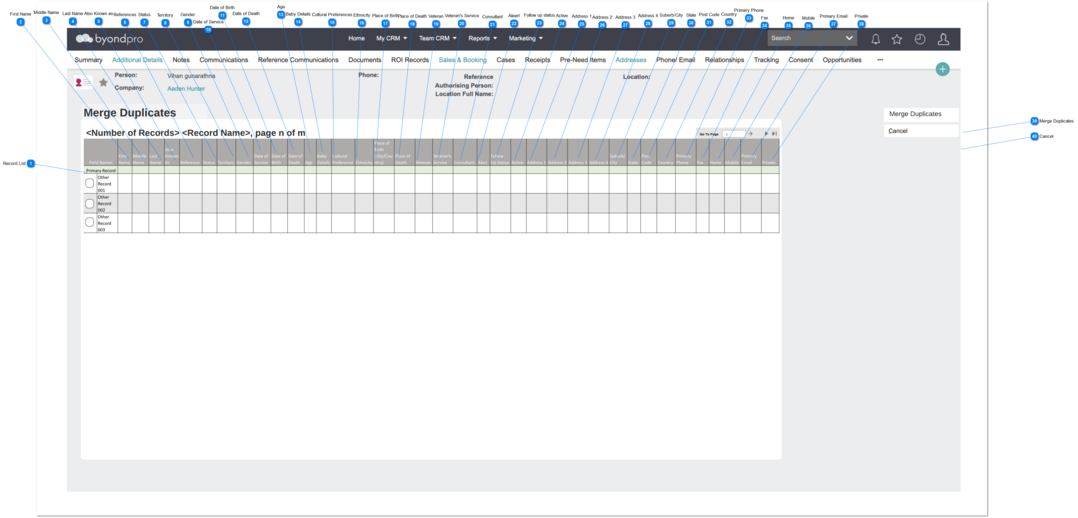
This is to compare the primary person record details and other selected duplicate person record(s).
This is located in Dashboard -> Person -> Merge Duplicate -> Search Duplicates -> Merge Duplicates screen
Record List
Type
Notes
Rules
Compulsory
Placeholder
Format
Edit
Size
Default
Messages
Table
Pre Condition:
1. In order to view the results in the results grid,
1. ALL the person records selected from the search results list , will be list down in this table.
2. By default, sort the table by the column "First Name" in ASC order.
3. This table allows the user to,
sort by all the columns in ASC or DESC order.
move between other pages by the navigator placed at the top right corner of the table.
4. If the system found records, show the text, placed at the top left corner of the table. The format of the text is
5. If no results found, show the text "No Person records", placed at the top left corner of the table.
6. IF the data/details of a record empty/null, the column will be blank.
7. User can select multiple records at once by clicking the checkbox.
8. The very first row of the detailed comparison table need to be the primary person record and the checkbox should not be available for this record and need to display details listed in the Merge Duplicate record (primary record) screen.
-
-
-
-
-
-
-
First Name
Type
Notes
Rules
Compulsory
Placeholder
Format
Edit
Size
Default
Messages
Text Field
-
1. First Name listed in the relevent Person screen will be displayed here.
Optional
-
Text
-
-
-
-
Middle Name
Type
Notes
Rules
Compulsory
Placeholder
Format
Edit
Size
Default
Messages
Text Field
-
1. Middle Name listed in the relevent Person screen will be displayed here.
Optional
-
Text
-
-
-
-
Last Name
Type
Notes
Rules
Compulsory
Placeholder
Format
Edit
Size
Default
Messages
Text Field
-
1. Last Name listed in the relevent Person screen will be displayed here.
Optional
-
Text
-
-
-
-
Also Known as
Type
Notes
Rules
Compulsory
Placeholder
Format
Edit
Size
Default
Messages
Text Field
-
1. Also Known As listed in the relevent Person screen will be displayed here.
Optional
-
Text
-
-
-
-
References
Type
Notes
Rules
Compulsory
Placeholder
Format
Edit
Size
Default
Messages
Text Field
-
1. References listed in the relevent Person screen will be displayed here.
Optional
-
Text
-
-
-
-
Status
Type
Notes
Rules
Compulsory
Placeholder
Format
Edit
Size
Default
Messages
Text Field
-
1. Status listed in the relevent Person screen will be displayed here.
Optional
-
Text
-
-
-
-
Territory
Type
Notes
Rules
Compulsory
Placeholder
Format
Edit
Size
Default
Messages
Text Field
-
1. Territory listed in the relevent Person screen will be displayed here.
Optional
-
Text
-
-
-
-
Gender
Type
Notes
Rules
Compulsory
Placeholder
Format
Edit
Size
Default
Messages
Text Field
-
1. Gender listed in the relevent Person screen will be displayed here.
Optional
-
Text
-
-
-
-
Date of Service
Type
Notes
Rules
Compulsory
Placeholder
Format
Edit
Size
Default
Messages
Date only
-
1. Date of Service listed in the relevent Person screen will be displayed here.
Optional
-
Text
-
-
-
-
Date of Birth
Type
Notes
Rules
Compulsory
Placeholder
Format
Edit
Size
Default
Messages
Date only
-
1. Date of Birth listed in the relevent Person screen will be displayed here.
Optional
-
Text
-
-
-
-
Date of Death
Type
Notes
Rules
Compulsory
Placeholder
Format
Edit
Size
Default
Messages
Date only
-
1. Date of Death listed in the relevent Person screen will be displayed here.
Optional
-
Text
-
-
-
-
Age
Type
Notes
Rules
Compulsory
Placeholder
Format
Edit
Size
Default
Messages
Text Field
-
1. Age listed in the relevent Person screen will be displayed here.
Optional
-
Text
-
-
-
-
Baby Details
Type
Notes
Rules
Compulsory
Placeholder
Format
Edit
Size
Default
Messages
Text Field
-
1. Baby details listed in the relevent Person screen will be displayed here.
Optional
-
Text
-
-
-
-
Cultural Preferences
Type
Notes
Rules
Compulsory
Placeholder
Format
Edit
Size
Default
Messages
Text Field
-
1. Cultural listed in the relevent Person screen will be displayed here.
Optional
-
Text
-
-
-
-
Ethnicity
Type
Notes
Rules
Compulsory
Placeholder
Format
Edit
Size
Default
Messages
Text Field
-
1. Ethnicity listed in the relevent Person screen will be displayed here.
Optional
-
Text
-
-
-
-
Place of Birth
Type
Notes
Rules
Compulsory
Placeholder
Format
Edit
Size
Default
Messages
Text Field
-
1. Place of Birth listed in the relevent Person screen will be displayed here.
Optional
-
Text
-
-
-
-
Place of Death
Type
Notes
Rules
Compulsory
Placeholder
Format
Edit
Size
Default
Messages
Text Field
-
1. Place of Death listed in the relevent Person screen will be displayed here.
Optional
-
Text
-
-
-
-
Veteran
Type
Notes
Rules
Compulsory
Placeholder
Format
Edit
Size
Default
Messages
Text Field
-
1. Veteran listed in the relevent Person screen will be displayed here.
Optional
-
Text
-
-
-
-
Veteran's Service
Type
Notes
Rules
Compulsory
Placeholder
Format
Edit
Size
Default
Messages
Text Field
-
1. Veteran's Service listed in the relevent Person screen will be displayed here.
Optional
-
Text
-
-
-
-
Consultant
Type
Notes
Rules
Compulsory
Placeholder
Format
Edit
Size
Default
Messages
Text Field
-
1. Consultant listed in the relevent Person screen will be displayed here.
Optional
-
Text
-
-
-
-
Aleart
Type
Notes
Rules
Compulsory
Placeholder
Format
Edit
Size
Default
Messages
Text Field
-
1. Aleart listed in the relevent Person screen will be displayed here.
Optional
-
Text
-
-
-
-
Follow up status
Type
Notes
Rules
Compulsory
Placeholder
Format
Edit
Size
Default
Messages
Text Field
-
1. Follow up status listed in the relevent Person screen will be displayed here.
Optional
-
Text
-
-
-
-
Active
Type
Notes
Rules
Compulsory
Placeholder
Format
Edit
Size
Default
Messages
Text Field
-
1. Active status listed in the relevent Person screen will be displayed here.
Optional
-
Text
-
-
-
-
Address 1
Type
Notes
Rules
Compulsory
Placeholder
Format
Edit
Size
Default
Messages
Text Field
-
1. Address 1 listed in the relevent Person screen will be displayed here.
Optional
-
Text
-
-
-
-
Address 2
Type
Notes
Rules
Compulsory
Placeholder
Format
Edit
Size
Default
Messages
Text Field
-
1. Address 2 listed in the relevent Person screen will be displayed here.
Optional
-
Text
-
-
-
-
Address 3
Type
Notes
Rules
Compulsory
Placeholder
Format
Edit
Size
Default
Messages
Text Field
-
1. Address 3 listed in the relevent Person screen will be displayed here.
Optional
-
Text
-
-
-
-
Address 4
Type
Notes
Rules
Compulsory
Placeholder
Format
Edit
Size
Default
Messages
Text Field
-
1. Address 4 listed in the relevent Person screen will be displayed here.
Optional
-
Text
-
-
-
-
Suberb/City
Type
Notes
Rules
Compulsory
Placeholder
Format
Edit
Size
Default
Messages
Text Field
-
1. Suberb/ City listed in the relevent Person screen will be displayed here.
Optional
-
Text
-
-
-
-
State
Type
Notes
Rules
Compulsory
Placeholder
Format
Edit
Size
Default
Messages
Text Field
-
1. State listed in the relevent Person screen will be displayed here.
Optional
-
Text
-
-
-
-
Post Code
Type
Notes
Rules
Compulsory
Placeholder
Format
Edit
Size
Default
Messages
Text Field
-
1. Post Code listed in the relevent Person screen will be displayed here.
Optional
-
Text
-
-
-
-
Country
Type
Notes
Rules
Compulsory
Placeholder
Format
Edit
Size
Default
Messages
Text Field
-
1. Country listed in the relevent Person screen will be displayed here.
Optional
-
Text
-
-
-
-
Primary Phone
Type
Notes
Rules
Compulsory
Placeholder
Format
Edit
Size
Default
Messages
Text Field
-
1. Primary Phone listed in the relevent Person screen will be displayed here.
Optional
-
Text
-
-
-
-
Fax
Type
Notes
Rules
Compulsory
Placeholder
Format
Edit
Size
Default
Messages
Text Field
-
1. Fax listed in the relevent Person screen will be displayed here.
Optional
-
Text
-
-
-
-
Home
Type
Notes
Rules
Compulsory
Placeholder
Format
Edit
Size
Default
Messages
Text Field
-
1. Home (phone) listed in the relevent Person screen will be displayed here.
Optional
-
Text
-
-
-
-
Mobile
Type
Notes
Rules
Compulsory
Placeholder
Format
Edit
Size
Default
Messages
Text Field
-
1. Mobile (phone) listed in the relevent Person screen will be displayed here.
Optional
-
Text
-
-
-
-
Primary Email
Type
Notes
Rules
Compulsory
Placeholder
Format
Edit
Size
Default
Messages
Text Field
-
1. Primary Email listed in the relevent Person screen will be displayed here.
Optional
-
Text
-
-
-
-
Private
Type
Notes
Rules
Compulsory
Placeholder
Format
Edit
Size
Default
Messages
Text Field
-
1. Private (Email) listed in the relevent Person screen will be displayed here.
Optional
-
Text
-
-
-
-
Merge Duplicates
Type
Notes
Rules
Compulsory
Placeholder
Format
Edit
Size
Default
Messages
Button
Post-conditions:
1. Upon the clicking on this button, all the selected records will merge with the primary person record and need to have a soft delete.
-
-
-
-
-
-
-
Cancel
Type
Notes
Rules
Compulsory
Placeholder
Format
Edit
Size
Default
Messages
Button
Post-conditions:
1. Clear all the selected records from Results Table.
1. Upon the clicking on this button, it will clear all the selected records.
-
-
-
-
-
-
-