To properly display this page you need a browser with JavaScript support.
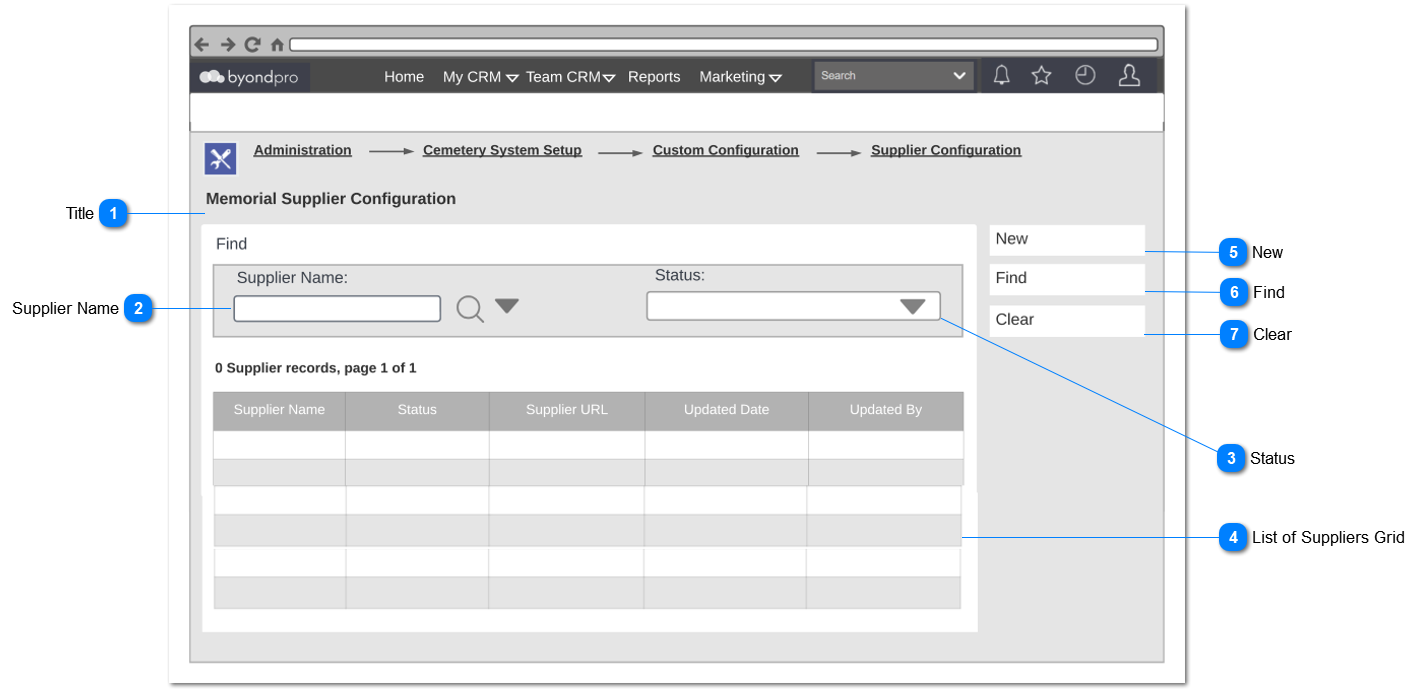
Memorial Supplier Configuration
Overview
This new feature is to configure the memorial suppliers and their website ordering URL, for access from the Memorial Order screen, within a Sales & Booking record.
Title
Type
Notes
Rules
Compulsory
Placeholder
Format
Edit
Size
Default
Messages
Read Only Text
-
1. Show title field of the screen.
-
-
-
-
-
-
-
Supplier Name
Type
Notes
Rules
Compulsory
Placeholder
Format
Edit
Size
Default
Messages
Advanced Search Selection
-
-
-
-
-
-
-
-
Status
Type
Notes
Rules
Compulsory
Placeholder
Format
Edit
Size
Default
Messages
Selection List
-
1. List down the status names as 'Active' and 'Inactive'
-
-
-
-
-
-
-
List of Suppliers Grid
Type
Notes
Rules
Compulsory
Placeholder
Format
Edit
Size
Default
Messages
Column Header
Supplier Name
2. Upon the clicking of the supplier name, user need to direct to memorial supplier configuration record.
-
-
Hyperlink
-
-
-
-
Column Header
Status
-
-
-
-
-
-
-
Column Header
Supplier URL
2. Upon the clicking of the supplier URL, user need to direct to memorial supplier configuration record.
-
-
Hyperlink
-
-
-
-
Column Header
Updated Date
-
-
Date & Time
-
-
-
-
Column Header
Updated By
-
-
-
-
-
-
-
New
Type
Notes
Rules
Compulsory
Placeholder
Format
Edit
Size
Default
Messages
Button
-
-
-
-
-
-
-
-
Find
Type
Notes
Rules
Compulsory
Placeholder
Format
Edit
Size
Default
Messages
Button
-
1. Upon clicking the button,
1a. Search results should be displayed in the supplier grid based on the selected search criteria.
-
-
-
-
-
-
-
Clear
Type
Notes
Rules
Compulsory
Placeholder
Format
Edit
Size
Default
Messages
Button
-
1. Upon clicking the button,
1a. Entered data should discarded without saving and reset the screen.
-
-
-
-
-
-
-