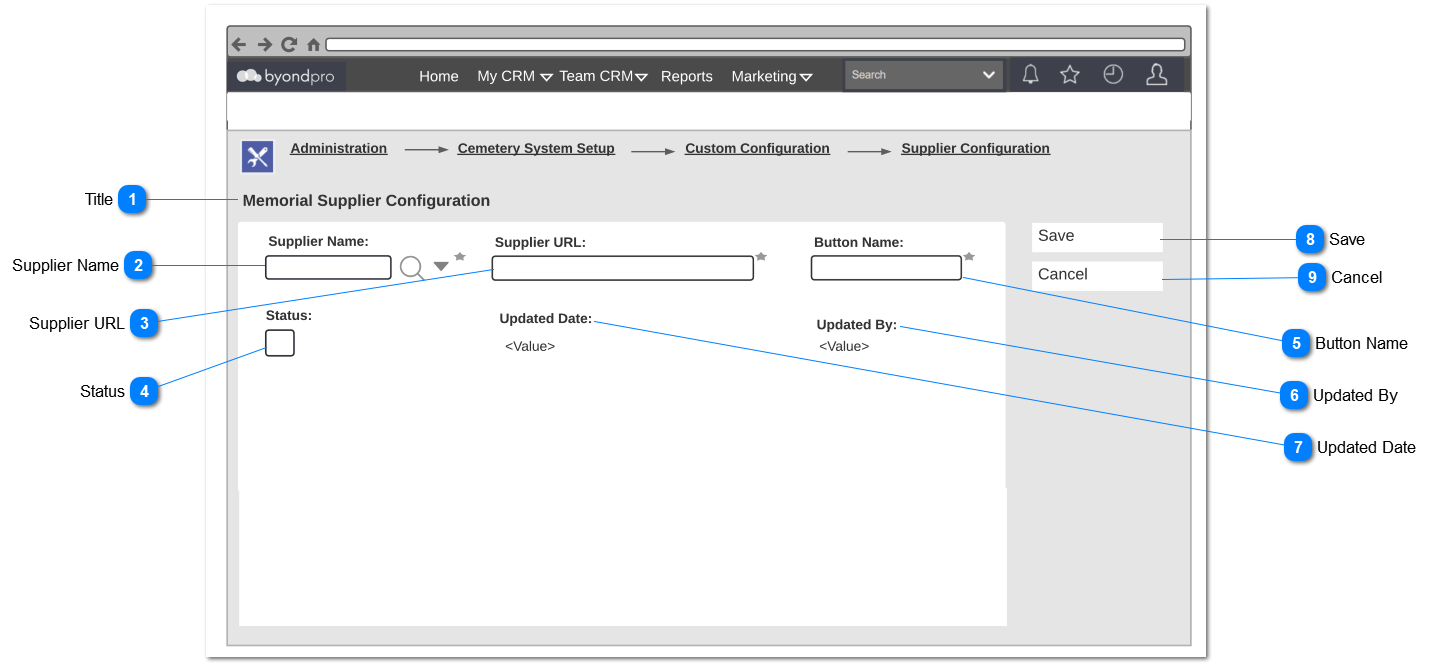
Memorial Order_Supplier Configuration - Creation
This Screen is used to add new and maintain existing memorial order suppliers.
When opening an existing record, it needs to open in edit mode.
 Title
|
Type
|
Notes
|
Rules
|
Compulsory
|
Placeholder
|
Format
|
Edit
|
Size
|
Default
|
Messages
|
|
Read Only Text
|
-
|
1. Title of the header.
|
-
|
-
|
-
|
-
|
-
|
-
|
-
| |
|
 Supplier Name
|
Type
|
Notes
|
Rules
|
Compulsory
|
Placeholder
|
Format
|
Edit
|
Size
|
Default
|
Messages
|
|
Advanced Search Selection
|
-
|
1. The company type define as vendors in (Company Type=vendors) should be listed out here as suppliers to select.
|
Yes
|
-
|
-
|
Yes
|
-
|
-
|
-
| |
|
 Supplier URL
|
Type
|
Notes
|
Rules
|
Compulsory
|
Placeholder
|
Format
|
Edit
|
Size
|
Default
|
Messages
|
|
Text Field
|
1. Enter the Supplier portal URL.
|
1. When the user clicks on 'Save' button,
1a. The system need to check whether it's a valid url address or not.
1b.The system need to check weather there is a duplicated URL.
2. If there is a duplicated URL, an error message need to display and cannot enter the URL.
|
Yes
|
-
|
-
|
Yes
|
-
|
-
|
2. Entered URL already exists.
| |
|
 Status
|
Type
|
Notes
|
Rules
|
Compulsory
|
Placeholder
|
Format
|
Edit
|
Size
|
Default
|
Messages
|
|
Check Box
|
-
|
-
|
No
|
-
|
-
|
Yes
|
-
|
Should be ticked.
|
-
| |
|
 Button Name
|
Type
|
Notes
|
Rules
|
Compulsory
|
Placeholder
|
Format
|
Edit
|
Size
|
Default
|
Messages
|
|
Text
|
|
Post Condition:
1. The button name defined here, needs to display as the button name field on the memorial order screen.
|
-
|
-
|
-
|
Yes
|
20
|
-
|
-
| |
|
 Updated By
|
Type
|
Notes
|
Rules
|
Compulsory
|
Placeholder
|
Format
|
Edit
|
Size
|
Default
|
Messages
|
|
Read Only Text
|
Displays after record is created.
|
1. Generated the logged in user's full name of the configuration has made should be shown here.
|
-
|
-
|
-
|
-
|
-
|
-
|
-
| |
|
 Updated Date
|
Type
|
Notes
|
Rules
|
Compulsory
|
Placeholder
|
Format
|
Edit
|
Size
|
Default
|
Messages
|
|
Read Only Text
|
Displays after record is created.
|
1. Generated the time stamp of the configuration has made should be shown here.
|
-
|
-
|
Date & Time
|
-
|
-
|
-
|
-
| |
|
 Save
|
Type
|
Notes
|
Rules
|
Compulsory
|
Placeholder
|
Format
|
Edit
|
Size
|
Default
|
Messages
|
|
Button
|
-
|
Upon clicking,
1. If all the mandatory fields are filled,
Then
1a. Save the configurations.
1b. Success message should be shown.
Else
1d. Show the error message
|
-
|
-
|
-
|
-
|
-
|
-
|
Success Message:
1b. Record has been updated.
Error Message:
1d. Default SAGE CRM error message for mandatory fields.
| |
|
 Cancel
|
Type
|
Notes
|
Rules
|
Compulsory
|
Placeholder
|
Format
|
Edit
|
Size
|
Default
|
Messages
|
|
Button
|
-
|
1. Upon clicking,
1a. Entered data should be discarded without saving.
|
-
|
-
|
-
|
-
|
-
|
-
|
-
| |
|