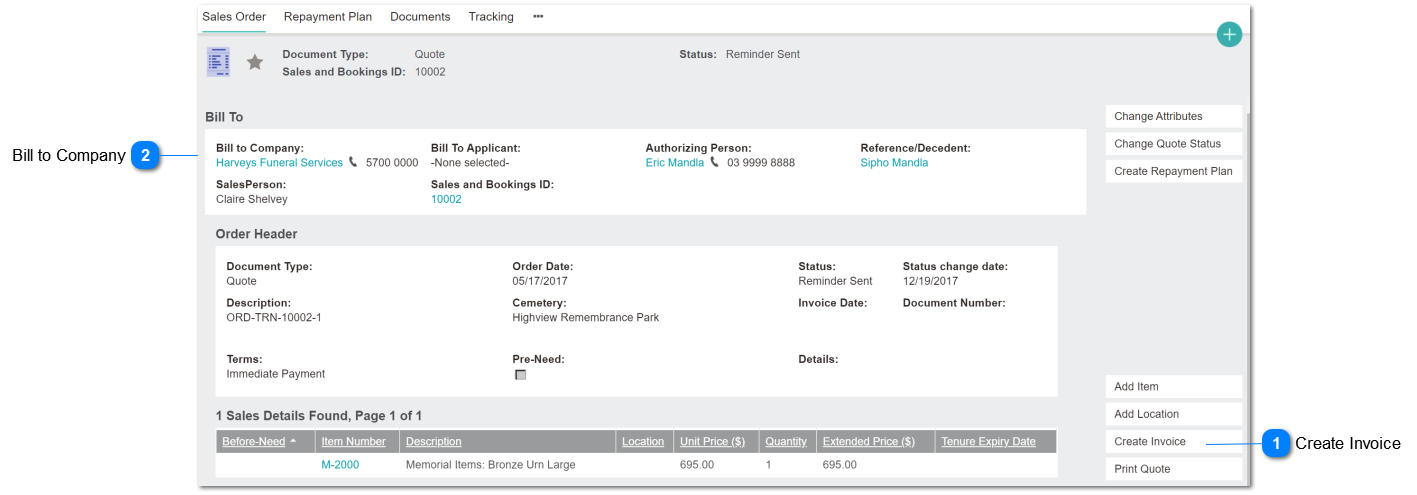
This fix will change the invoice validation from verifying the company requirements according to the FD link on the Sales & Booking Summary screen, and move to Bill-to-Company on the order header
Create Invoice
Existing button
Type
Notes
Rules
Compulsory
Format
Edit
Size
Default
Error Message
button
Change existing function re PO Number validation.
Currently 1 & 2 references tran_funeralcompanyid.
This revision changes reference to orhe_billtocompanyid - Bill to Company
1. If Bill to Company is null - no action.
2. If Bill to Company is not null, then check Company record for Compulsory PO on Booking (comp_compulsoryponumber)
2a. If Compulsory PO number is null or 'N' - no action.
2b. If Company Compulsory PO number is Y and S&B PO Number (tran_purchaseorder) is not null - no action.
2c. If Company Compulsory PO number is Y and S&B PO Number (tran_purchaseorder) is null - do not proceed (abort invoice sequence).
No other change to existing Create Invoice rules.
3. Needs to validate that where the invoice contains a ROI item, that related to Location Sales Status = Quoted.
(example: -User A creates a S&B, add a location and print quote.
-Admin supervisor change the status as 'Available for Sale' against the location.
-User B selects this location due to 'Available for Sale' status and creates a S&B and add a location and invoiced.
-User A again, open the created Quote and generate the invoice without an issue.)
Therefore, when creating 2nd invoice, need to throw an error message
3a. If Sales Status = Quoted -> proceed and create the invoice.
3b. If not, display a warning message and abort invoice function, and return to the sales order summary screen.
N
Button
Yes
2c) use existing error message.
Invoice not created. The Booking's funeral company requires a PO number to be provided within the booking record.
3b. The Location is no longer in a 'Quoted' status, and this invoice can not proceed. Please check the Location details with your system administrator.