To properly display this page you need a browser with JavaScript support.
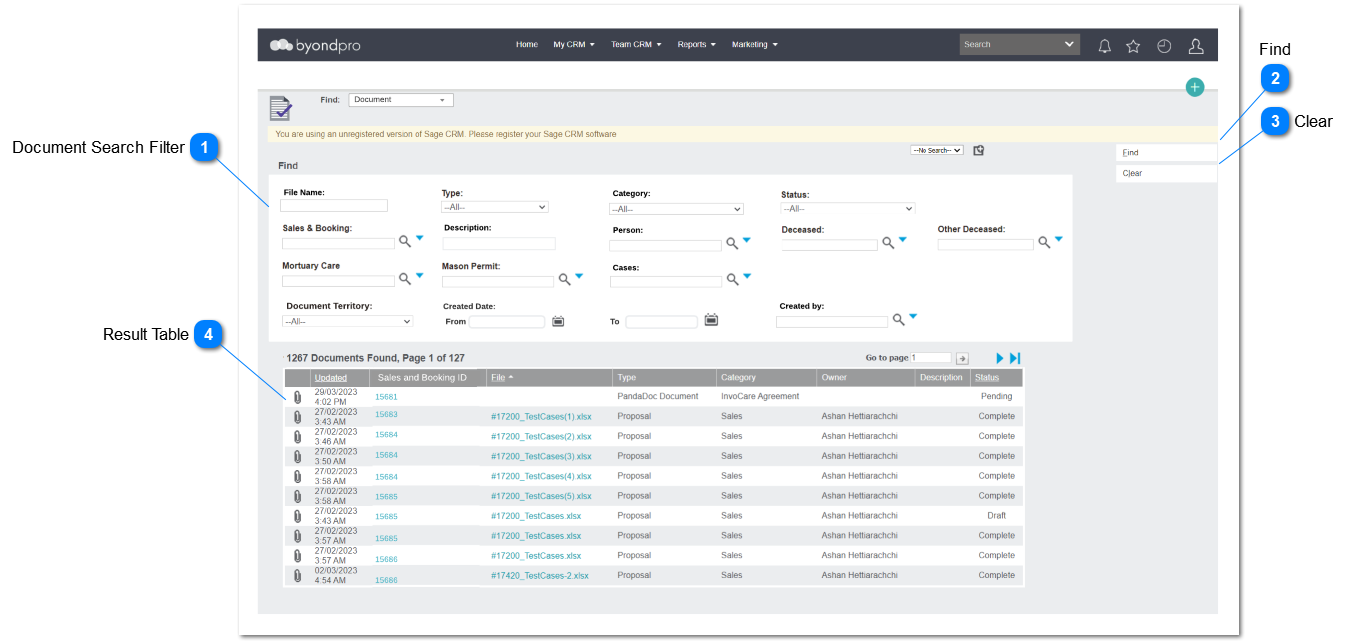
This functionality will allow the user to search uploaded documents related to sales and booking, cases, mason permits, and mortuary care. Additionally, it will include the ability to filter the results according to the user's expectations.
Document Search Filter
Document search filter will be provided with range of filter options to filter results related to sales and booking, cases, mason permits and mortuary care.
Type
Notes
Rules
Compulsory
Placeholder
Format
Edit
Size
Default
Messages
Advance Search
Sales and Booking ID
Sales and Booking = opssaleid
-
-
Text
-
-
-
-
Advance Search
Location Code
Location = locationid
-
-
Text
-
-
-
-
Advance Search
Person
Person = Datalibr_personid
-
-
Text
-
-
-
-
Advance Search
Deceased Person
Deceased = libr_deceaseidTex
-
-
Text
-
-
-
-
Advance Search
Other Decease
Other Deceased = libr_decease2id
-
-
Text
-
-
-
-
Advance Search
Mason Permit
Mason Permit = permitid
-
-
Text
-
-
-
-
Advance Search
Mortuary Care
Mortuary Care = ofamortuarycareid
-
-
Text
-
-
-
-
Advance Search
Cases
Case = case_referenceid
-
-
Text
-
-
-
-
Text Field
File Name
File Name = Libr_Filenam
-
-
Text
-
-
-
-
Text Field
Description
Description = libr_note
-
-
Text
-
-
-
-
Drop Down
Type
Type = libr_type
-
-
-
-
-
All
-
Drop Down
Category
Category = libr_catergory
-
-
-
-
-
All
-
Drop Down
Status
Status = libr_status
-
-
-
-
-
All
-
Drop Down
Document Territory
Document Territory = libr_secterr
-
-
-
-
-
All
-
Updated Date
Updated Date
Updated Date = Libr_UpdatedDat
-
-
Date
-
-
-
-
Find
Type
Notes
Rules
Compulsory
Placeholder
Format
Edit
Size
Default
Messages
Action Button
Clicking action button will generate finding results
Clicking action button will generate finding results based on filter criteria
-
-
-
-
-
-
-
Clear
Type
Notes
Rules
Compulsory
Placeholder
Format
Edit
Size
Default
Messages
Action Button
Click action button will reset the filter
This will click action button will reset the filter to default option/ blank
-
-
-
-
-
-
-
Result Table
Result table will be displayed with filter results based on filter criteria.
Type
Notes
Rules
Compulsory
Placeholder
Format
Edit
Size
Default
Messages
Hyperlink
Attachment
Clicking the icon will open a separate tab viewing the document attached (Home> Sales and Booking> Document Tab> Document Record> Attached Document)
Attachment = Libr_hasattachment
-
-
-
-
-
-
-
Read Only Text
Updated Date
Updated = Libr_UpdatedDat
-
-
-
-
-
-
-
Hyperlink
Sales and Booking ID
Clicking the sales and booking ID will direct the user to Sales and Booking Record. (Home> Sales and Booking> Sales and Booking Summary)
Sales and Booking = opssaleid
-
-
-
-
-
-
-
Hyperlink
File name
Clicking the file name will direct the user to document record (Home> Sales and Booking> Document Tab> Document Record)
-
-
-
-
-
-
-
Read Only Text
Type
Type = libr_type
-
-
-
-
-
-
-
Read Only Text
Category
Category = libr_catergory
-
-
-
-
-
-
-
Read Only Text
Owner
Owner = Libr_UserId
-
-
-
-
-
-
-
Read Only Text
Description
Description = Libr_Note
-
-
-
-
-
-
-
Read Only Text
Status
Status = Libr_Status
-
-
-
-
-
-
-