To properly display this page you need a browser with JavaScript support.
Customer Payment Report - Parameters
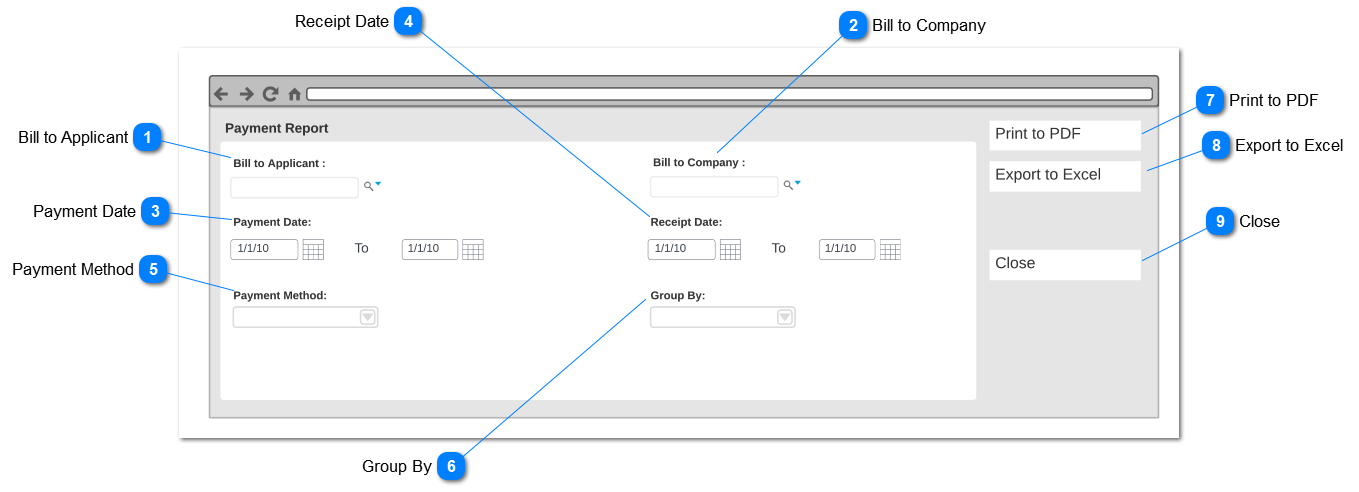
This screen will appear on Reports> Finance Reports> Payment Report> Customer Payment Report where a separate screen pop-up to enter Customer Payment Report - Parameters.
Bill to Applicant
Type
Notes
Rules
Compulsory
Placeholder
Format
Edit
Size
Default
Messages
Advance Select Search
-
Advance search on Bill to Applicant Selected forms the persons register.
-
-
-
-
-
-
-
Bill to Company
Type
Notes
Rules
Compulsory
Placeholder
Format
Edit
Size
Default
Messages
Advance Select Search
-
Pre Condition:
1. There should be at least one company record added via New Company.
2. Advance search on Bill to Company Selected forms the Company register.
-
-
-
-
-
-
-
Payment Date
Type
Notes
Rules
Compulsory
Placeholder
Format
Edit
Size
Default
Messages
Date Range
-
Select date range is selected filter result based on Payment date.
Payment date filtered from the Repayment date recorded on Repayment Plan (Sales and Booking> Sales> Sales Order> Repayment Plan> Repayment Date).
Filtration should allow the user to filter result for future date where "pending" status payments will be listed on the report.
-
-
-
-
-
-
-
Receipt Date
Type
Notes
Rules
Compulsory
Placeholder
Format
Edit
Size
Default
Messages
Date Range
-
Select date range is selected filter result based on Receipt date.
Receipt date filtered from the Receipt date recorded on Receipt tab (Sales and Booking> Receipt Tab> Receipt Date)
-
-
-
-
-
-
-
Payment Method
Type
Notes
Rules
Compulsory
Placeholder
Format
Edit
Size
Default
Messages
Drop-Down
-
-
-
-
-
-
-
-
Group By
Type
Notes
Rules
Compulsory
Placeholder
Format
Edit
Size
Default
Messages
Drop-Down
-
-
-
-
-
-
-
-
Print to PDF
Type
Notes
Rules
Compulsory
Placeholder
Format
Edit
Size
Default
Messages
Action Button
-
Pre-condition -
At least one filter option should be selected
-
-
-
-
-
-
-
Export to Excel
Type
Notes
Rules
Compulsory
Placeholder
Format
Edit
Size
Default
Messages
Action Button
-
Pre-condition -
At least one filter option should be selected
-
-
-
-
-
-
-
Close
Type
Notes
Rules
Compulsory
Placeholder
Format
Edit
Size
Default
Messages
Action Button
-
Clicking the action button will close Payment Report - Parameter screen will return to Finance Reports list.
-
-
-
-
-
-
-