byondpro
Functional Specifications
×
Menu
Index

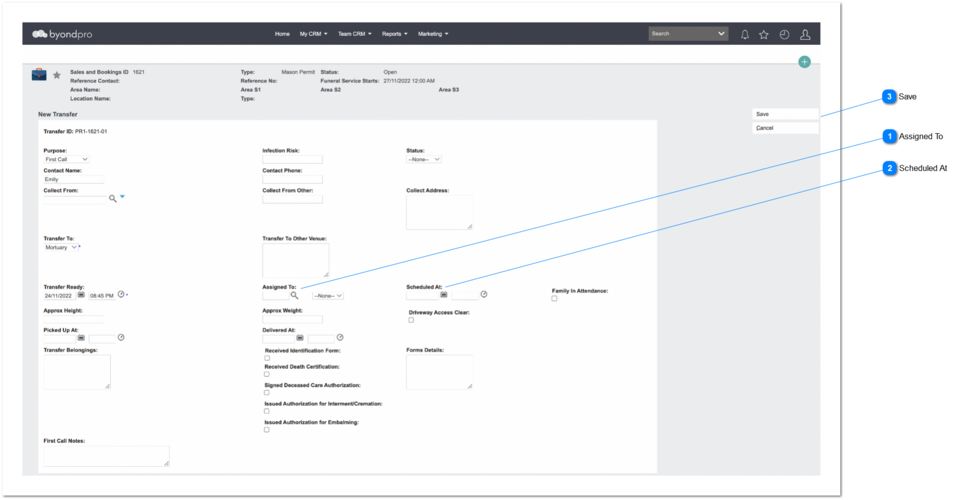
Create Calendar Event - Assigned To User


Create Calendar Event - Assigned To User
1

Assigned To

Type
Notes
Rules
Compulsory
Format
Edit
Size
Default
Error Message
User Select
Pre-conditions:
1. Existence of at least one sales & booking record with Record Type = Funeral Homes
1. A list of (active) users and resources created underneath the funeral home.
 
2. This element conforms to standard CRM advanced search select field controls.
-
Text
-
-
-
-
2

Scheduled At

 
Type
Notes
Rules
Compulsory
Format
Edit
Size
Default
Error Message
Date & Time Field
Pre-conditions:
1. In order to create a calendar event under assign to user's calendar:
1a. Sales & Booking module -> Summary screen -> Record Type = Funeral Homes
 
1b. Administration -> Cemetery System Setup -> Custom Configuration -> FHTransferAssignments = Yes
 
2. Standard byondpro date and time format need to apply here.
1. If the Schedule at - Date is blank, cannot enter a time (no action).


-
Date & Time
-
-
-
-
3

Save

Type
Notes
Rules
Compulsory
Format
Edit
Size
Default
Error Message
Button
-
1. If FHTransferAssignments = Yes, and the Assigned To field has been selected, and the Schedule at - Date has been selected, the Schedule at - Time need to select.
1a. If any of those is blank, an error message need to be displayed and there are one option available within the error message.
 
2. If Assigned To field has been selected, but Schedule At Date/Time fields are blank, an error message need to be displayed and there are two options available within the error message.
 
3. Create new Appointment per Create Appointment: FH Transfer
-
-
-
-
-
1. You have not set a Time for the Transfer, do you want to proceed?
OK - Save the record.
Cancel - Returns to Transfer summary screen to complete the missing details.
 
2. You have not set a Date & Time for the Transfer, do you want to proceed?
OK - Save the record.
Cancel - Returns to Transfer summary screen to complete the missing details.
The online help was created with Dr.Explain