To properly display this page you need a browser with JavaScript support.
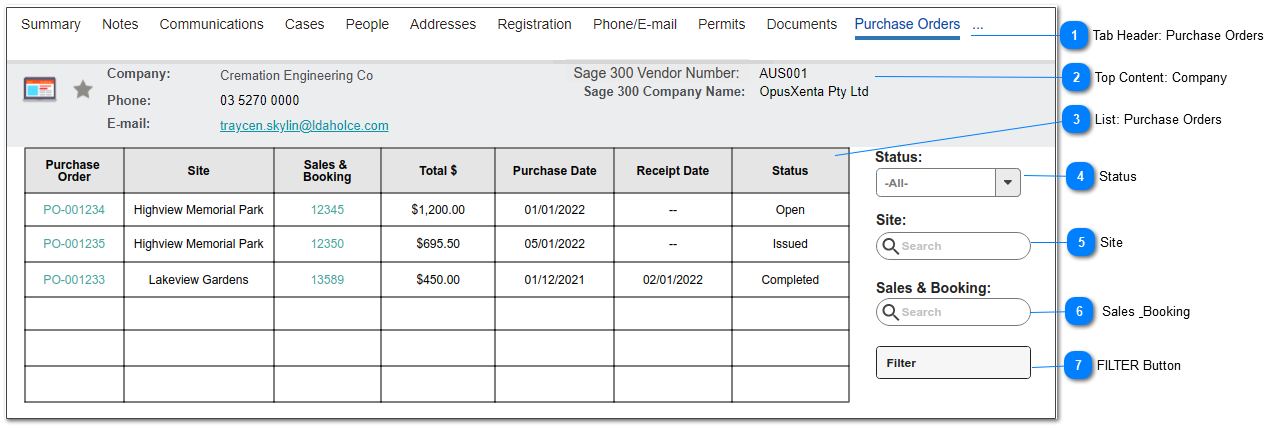
Company: Purchase Order List
This is the list of Purchase Orders in the context of a Supplier/Company record.
Tab Header: Purchase Orders
This tab will contain a list of Purchase Orders for the corresponding Company / Supplier record.
Top Content: Company
This is the existing top content layout for byondpro Company records, showing a record integrated with Sage 300 Vendors.
List: Purchase Orders
This is the list of purchase orders, where the Supplier is the corresponding Company record.
This list includes standard CRM number of results found and page navigation objects.
All column headers are to be sortable.
Column
Display Rules
Purchase Order
display Purchase Order Number
hyperlink to Purchase Order Header summary screen, view mode
Site
Site Name
Sales & Booking
display Sales & Booking ID
hyperlink to Sales & Booking summary screen, view mode
Total $
display Purchase Order Total
Purchase Date
display Purchase Date
Receipt Date
display Receipt Date
Status
display Purchase Order Status
Status
This is an option to filter the list by Purchase Order status.
Type
Notes
Rules
Compulsory
Format
Edit
Size
Default
Error Message
Selection List
1. This is the Purchase Order STATUS field
1a. Selection List values:
- Open
- Issued
- Cancelled
- Completed
N
Y
- All -
Site
This is an option to filter the list by Site.
Type
Notes
Rules
Compulsory
Format
Edit
Size
Default
Error Message
Search Select
1. Lookup to Site records.
1a. Show the following column names:
- Site Code
- Site Name
N
Y
Sales & Booking
This is an option to filter the list by the Sales & Booking record linked to the Purchase Order.
Type
Notes
Rules
Compulsory
Format
Edit
Size
Default
Error Message
Search Select
1. Lookup to Sales & Booking records.
1a. Show the following column values:
- Sales & Booking ID
- Type
- Status
- Deceased Name
N
Y
- All -
FILTER Button
This is an action button to filter the records shown in the Purchase Order list according to the criteria selected.
Type
Notes
Rules
Compulsory
Format
Edit
Size
Default
Error Message
Button
1. When selected, filter the Purchase Order list according to the values selected in:
4) Status
5) Site
6) Sales & Booking