byondpro
Functional Specifications
×
Menu
Index

Change Territory

 
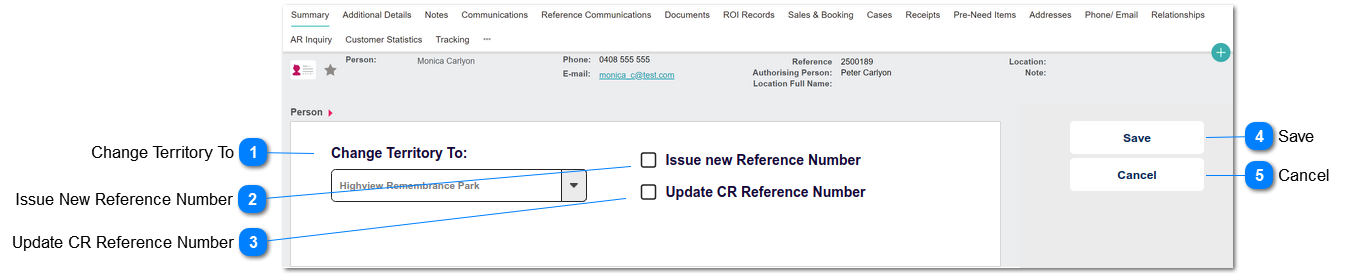
This screen allows designated users to change the territory on a person record.
 
Change Territory
1

Change Territory To

 
This is a selection list of Territories.
 
Type
Notes
Rules
Compulsory
Format
Edit
Size
Default
Error Message
Selection List
 
1. User cannot select the uppermost (parent) territory
Y
 
Y
 
 
1. The parent territory cannot be used on person records.
2

Issue New Reference Number

 
This is a checkbox to indicate whether a new reference number (per the territory) should be assigned to the record.
 
Type
Notes
Rules
Compulsory
Format
Edit
Size
Default
Error Message
Button
 
 
N
 
Y


3

Update CR Reference Number

 
This is a checkbox to indicate whether the CR-reference number should be updated to match the newly assigned reference number.
 
Type
Notes
Rules
Compulsory
Format
Edit
Size
Default
Error Message
Button
 
1. Show if Person Disposition = Cremated.
N
 
Y


4

Save

 
This a button action to allow users to change the assigned territory on a person record.
 
Type
Notes
Rules
Compulsory
Format
Edit
Size
Default
Error Message
Button
 
1. Change person territory value per selection in #1
 
2. If Issue New Reference Number = Y, then over-write existing reference number field with next number in accordance with existing reference number assignment rules.
 
2a. Write a tracking record with note: Reference Number changed from [previous ref number] to [new ref number]
 
3. If Update CR Reference Number = Y, then over-write the CR reference number on linked CR Records, by replacing "CR-[reference]" with CR-[new reference number].
 
3a. If >1 CR record associated with deceased, need to retain "A", "B" portion reference indicator at the end of CR-reference string.
 
3b. Write a tracking record on the Person and CR records with note: CR Reference Number changed from [previous CR-ref number] to [new CR-ref number]


5

Cancel

 
This a button action that returns the user to the Person summary record, without updating the record.
 
Type
Notes
Rules
Compulsory
Format
Edit
Size
Default
Error Message
Button
 
1. Return user to person Summary screen.
1a. Do not save record changes
N


The online help was created with Dr.Explain