byondpro
Functional Specifications
×
Menu
Index

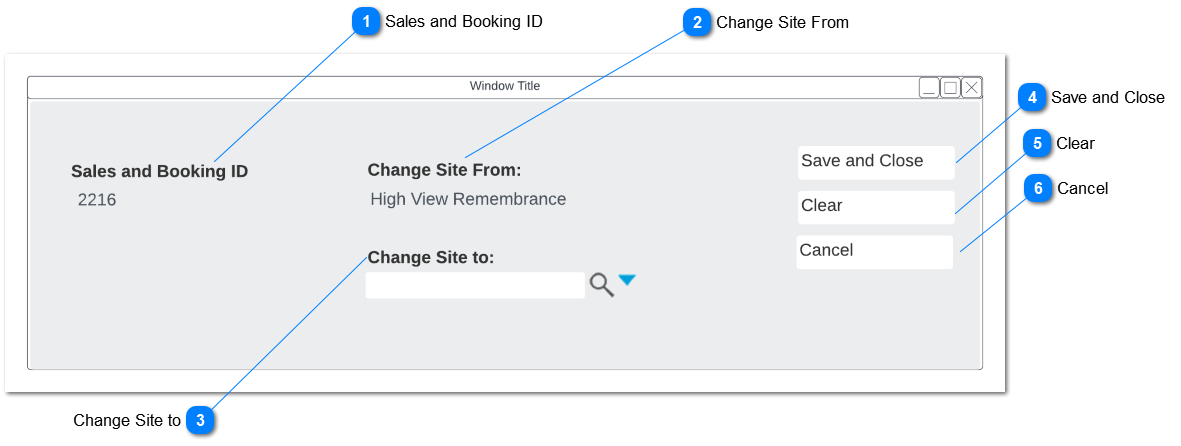
Change Site Popup

 
This is the Popup screen for change site option which allow the user to change the site.
 
Change Site Popup
1

Sales and Booking ID

 
Type
Notes
Rules
Compulsory
Placeholder
Format
Edit
Size
Default
Messages
Read Only
Display the Sales and Booking ID from sales and booking summary screen
-
-
-
-
-
-
-
-
2

Change Site From

 
Type
Notes
Rules
Compulsory
Placeholder
Format
Edit
Size
Default
Messages
Read Only
Display the site already selected for sales and booking
-
-
-
-
-
-
-
-
3

Change Site to

 
Type
Notes
Rules
Compulsory
Placeholder
Format
Edit
Size
Default
Messages
Advance Search Select
Allow the user to select the site that they wish to change to
-
-
-
-
-
-
-
-
4

Save and Close

 
Type
Notes
Rules
Compulsory
Placeholder
Format
Edit
Size
Default
Messages
Action Button
Clicking the action button will change the current site to the selected site
 
On SAVE, display Warning
 
  • Upon clicking Ok on the warning, following actions will be triggered;
 
  • Location: Any Locations on the Sales & Booking Summary screen will be removed.
     
  • Persons: There will be no actions, warning message will suggest user to check the Territory setting for all linked Person records, and separately make any required changes.
     
  • Other: If there any Memorial Orders, Permits, Sales Orders and Appointments linked to sales and booking record, The status of those records will be changed from open to cancelled.
     
  • If the Sales Order Details includes ROI Items, Set the Sales Status of the linked Location to Available for Sale
 
-
-
-
-
-
-
"If you proceed with this site change, please note the following impact to associated records:
LOCATIONS: Any Locations on the S&B Summary screen will be removed.
If Sales Order details includes ROI Items, Linked Location Sales Status will be changed to Available for Sale
 
PERSONS: No change but we suggest you check the Territory setting for all linked Person records, and separately make any required changes.
 
OTHER: There are other record types attached to this Sales & Booking record; if you proceed the status of open Memorial Orders, Permits, Sales Orders and Appointments will be set to Cancelled."
 
Waring messages related to Location, Persons and Other will only appear if related records are linked to the sales and booking.
5

Clear

 
Type
Notes
Rules
Compulsory
Placeholder
Format
Edit
Size
Default
Messages
 
Clicking the action button will clear/ reset "Change site to" field
-
-
-
-
-
-
-
-
6

Cancel

 
Type
Notes
Rules
Compulsory
Placeholder
Format
Edit
Size
Default
Messages
 
Clicking the action button will return to Sales Order screen
-
-
-
-
-
-
-
-
The online help was created with Dr.Explain