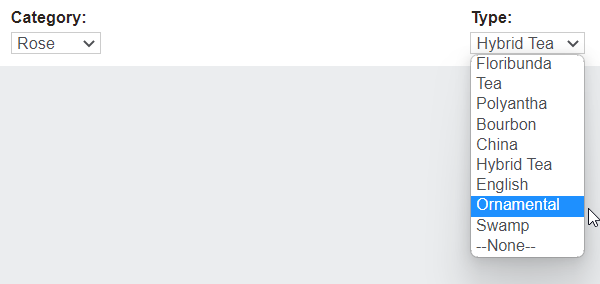
Type
Outlined below are examples for Rose & Tree categories.
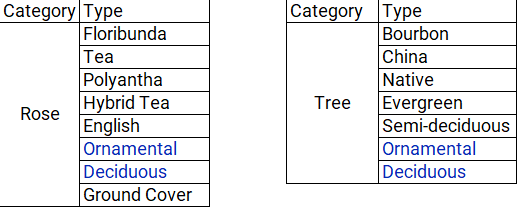
We can see from the tables above that our Rose & Tree both have Ornamental & Deciduous options.
This means ornamental will be set up with:
1. Ornamental to link to the type drop down list associated with roses
2. Ornamental to link to the type drop down list associated with trees.
And Deciduous will be set up with:
1. Deciduous to link to the type drop down list associated with roses
2. Deciduous to link to the type drop down list associated with trees.
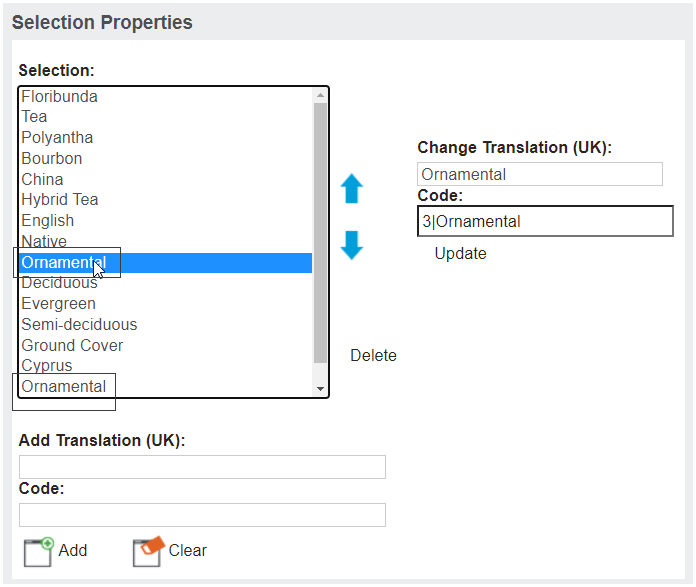
Rather than having the entire list of types presented, the configuration includes the leading number and pipe symbol, which means the list will return only the associated types for the category.
That said, in some instances (as outlined above) we will need to setup up a type multiple times if it is associated to more than one category.
To explain, configuration of Ornamental is shown below, where the first Ornamental listed is associated to 1|Ornamental which will show on the Rose drop down list and the second is associated to 2|Ornamental, and will therefore show on the Tree drop down list.