Search for a Mortuary record
Once a record has been created, it can be accessed using the Mortuary tile on the Dashboard display.
Complete a search using the details you have and the fields provided.
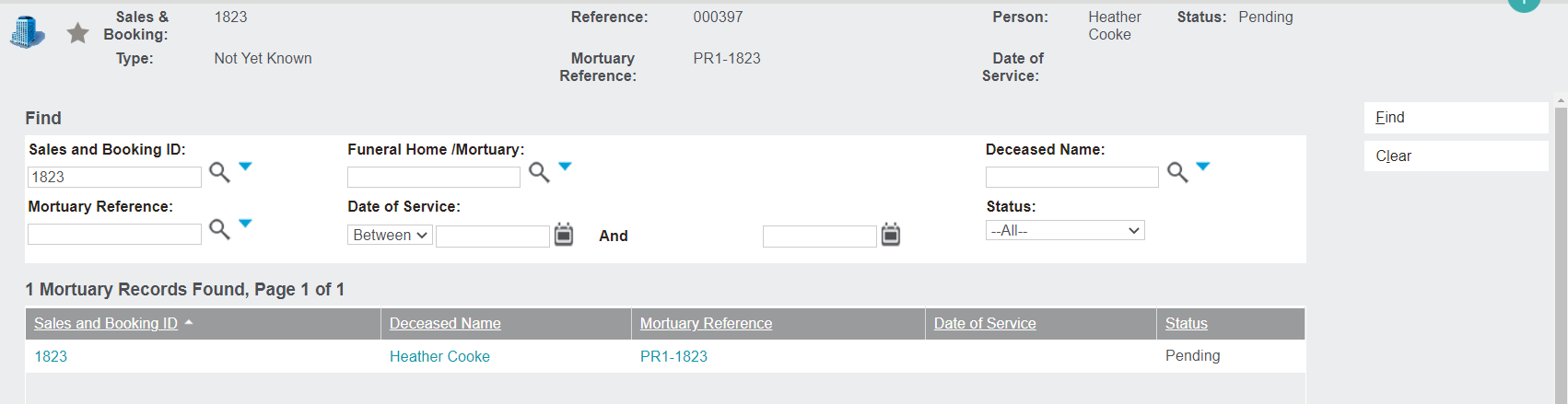
Then press the Find button on the right-hand side of the page.
The following information about the mortuary records which meet your search criteria display:
-
Sales & Booking ID hyperlink
-
Deceased Name hyperlink
-
Mortuary Reference hyperlink
-
Date of Service
-
Status of the Mortuary record.
Note the Mortuary Reference number includes the Site Code and the Sales & Booking reference number.

Click into the Mortuary record using the Mortuary Reference hyperlink.