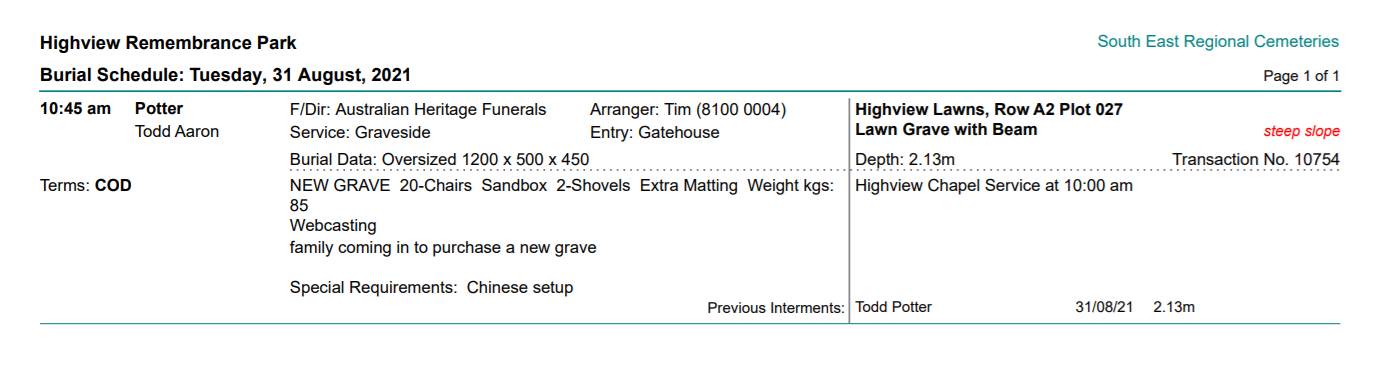
Schedule of Burial Services
This report details the burials and locations scheduled during a nominated timeframe for the cemetery.
Most cemeteries will have processes in place that any changes have to be made prior to a certain time frame of the services being provided, such as 24 hours before so these reports could be run the day prior for the next day's services.
This document could be provided to the grounds and services staff to ensure items such as chairs, umbrellas, sandboxes etc from the bookings tab of the Sales & Booking are available for the service.
Alternatively, this document could be printed out with Print Private set to No and copies left at the reception desk for families to look at and locate where the burial is and the time.
Choose the blue arrow in line with the Schedule of Burial Services.
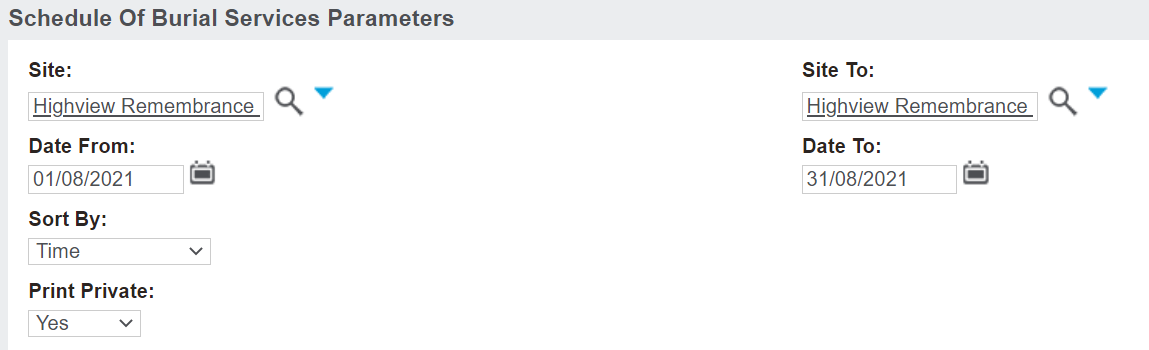
Search in the Site and Site To fields. Note, the report can be run for all sites, as well as individual sites.
Choose the date range in the Date From and To fields.
Determine if the data is organised by time, funeral director or surname in the Sort By fields.
Choose in the Print Private field, whether to show the names of the services marked private or not.
Choosing Yes will show the names of deceased records that were marked as private in the Sales & Booking. Choosing No will suppress the name of the deceased in the schedule, if the booking was marked as private.
On the right-hand side of the page, choose the Print to PDF action button.
Burial services booked in the chosen timeframe will display. Other related resource appointments for this booking will also be noted on the schedule to cross reference.