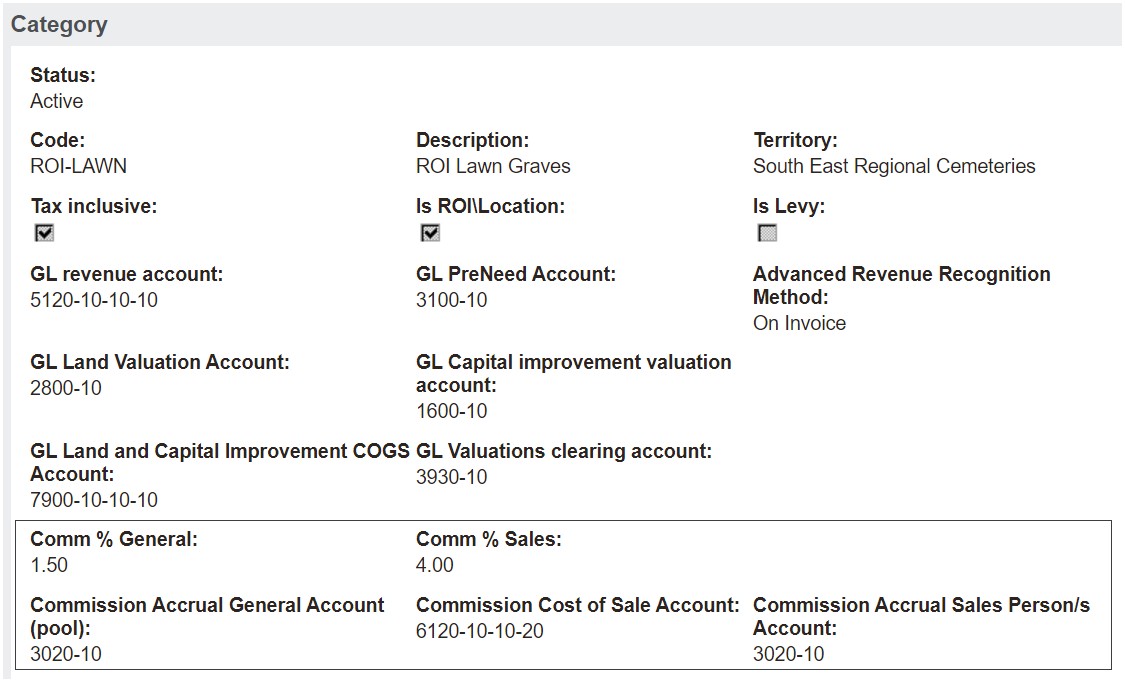
The percentage (%) rate of commission to apply needs to be configured for each product category in both the General and Salesperson fields.
The % is calculated on the tax exclusive amount of the sale.
Commission % General: is distributed equally between every user marked to earn commission.
e.g. 3 users participating in the program
Commission General: 1.5%
Each user earns 0.5%
Commission % Salesperson: is applied only to the salesperson marked on the sales invoice / credit header.
e.g. 3 users participating in the program
Commission Salesperson: 4%
Salesperson (only) earns 4%
In this example, the total amount of commission earned is 5.5% on the tax exclusive amount of the product.
When either of the Commission % General or Salesperson settings is 0, no commission earnings apply for that categorisation, and no commission tracking record will be written.
If a Salesperson Commission % is configured, but the salesperson marked on the sales invoice / credit header is not set up to earn commission, then no commission tracking record will be written.
Commissions General Ledger Accounts
The General Ledger codes against which commission journals are to be posted, are configured on each product category.
Commission Accrual General Account: balance sheet account to record general commissions earned, pending payment.
Commission Accrual Salesperson Account: balance sheet account to record salesperson commissions earned, pending payment.
Commission Cost of Sale Account: income statement account to record the commission as a cost of sale.
Where a site segment over-ride has been configured in byondpro, each journal will be attributed to the corresponding site / GL department.