Proximity Alert - Calendar Booking Rules
This feature is an extension to the existing byondpro Calendar rules, and is intended for use with burial / interment calendar resources. It introduces rules to prevent burials taking place in a similar timeframe in the same area within the grounds. This uses the GPS coordinates for each cemetery location to build an exclusion zone.
Three new fields on the Calendar rule screen let you define:
-
Proximity Alert: is activated when appointments are made for the Site + Action combination
-
Proximity Distance (in metres): the distance to be maintained between LocationsImperial conversion for feet to metres: 1 ft = .305m
-
Time Tolerance (in minutes): how much time is required before and after the existing appointment.
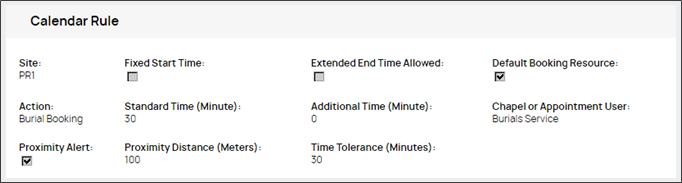
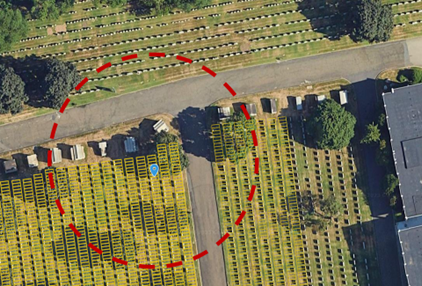
Example … using the settings shown above
Burial booking is 30 minutes duration (standard time)
Time tolerance is 30 minutes
Existing appointment: 10am – 10:30am
Outcome: new bookings within the proximity “zone” will be blocked between 9:30 – 11am.
|
9:00-9:30
|
--
|
|
9:30-10:00
|
blocked
|
|
10:00-10:30
|
Burial Booking
|
|
10:30-11:00
|
blocked
|
|
11:00-11:30
|
--
|
Note:
- the alert warns users of other bookings nearby; they can still “allow duplicates” if needed
- drawing not to scale (100m)