Person & Family Relationships

Purpose
The Relationships model in byondpro is used to link Person records and to define the manner in which they are related.
Fit within the Person Hierarchy
Each deceased record is linked with family members using relationships. The Authorising Person function on the Person summary screen automatically creates a corresponding relationship record. All others are created manually, as required.
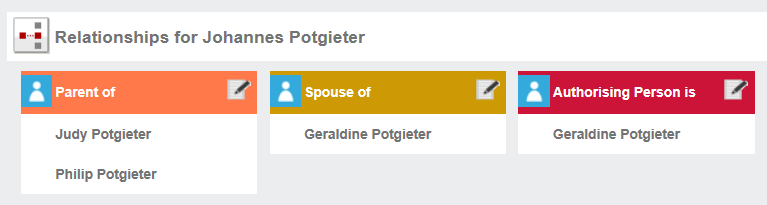
Relationships are presented on cards grouped and colour-coded by type.
Adding new Records
New entries are created on the Relationships screen of the Person record, using the centre icon.
Editing / Removing Records
Relationship records are edited using the pencil icon on the relationship card.
Standard Field List
|
Field
|
Description
|
Associated Business Process
|
|
Relationship type
|
Defaults to Relationships
|
System requirement
|
|
Relationship Name
|
Look up to type of relationship, e.g. spouse or sibling
|
|
|
Person
|
Look up to Person records
|
|
|
Notes
|
Free form text to clarify relationship
|
|
List of Relationships
|
Primary
|
Inverse on linked record
|
|
Carer/Advocate is
|
Carer/Advocate of
|
|
Parent of
|
Child of
|
|
Executor is
|
Executor of
|
|
Ex-Spouse/Partner is
|
Ex-Spouse/Partner of
|
|
Fiancee is
|
Fiancee of
|
|
Friend is
|
Friend of
|
|
Funeral Director is
|
Funeral Director of
|
|
Godchild of
|
Godparent is
|
|
Grandparent is
|
Grandchild of
|
|
Guardian/Administor is
|
Guardian/Administor of
|
|
Half-Sibling is
|
Half-Sibling of
|
|
Interested Party is
|
Interested Party of
|
|
Merge Contact is
|
Merge Contact of
|
|
Uncle/Aunt of
|
Niece/Nephew of
|
|
Parent-in-Law of
|
Child-in-Law is
|
|
Partner is
|
Partner of
|
|
Power of Attorney held by
|
Has Power of Attorney for
|
|
Relative is
|
Relative of
|
|
Religious Rep is
|
Religious Rep of
|
|
Sibling is
|
Sibling of
|
|
Sibling-in-Law is
|
Sibling-in-law of
|
|
Solicitor/Attorney is
|
Solicitor/Attorney of
|
|
Spouse is
|
Spouse of
|
|
Step-Parent is
|
Step-Parent of
|