Payment Details Tab
A new tab called Payment Details appears on the Sales Order in byondpro when the recurring payment schedule has been activated.
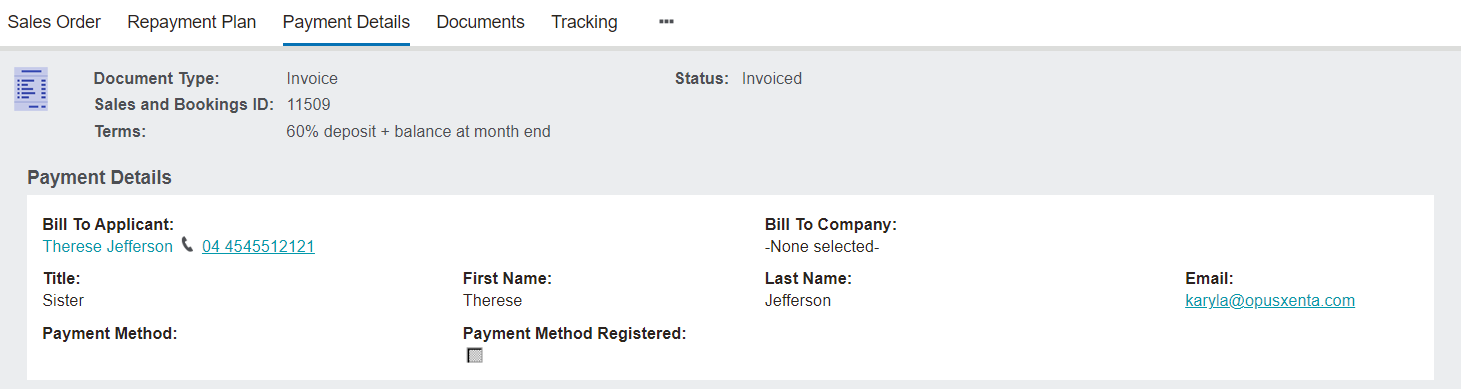
To make changes to this screen, select the Change button.

The Bill to Applicant / Bill To Company fields will populate as per the summary tab of the Sales Order.
However, should the payee be a different person, this field can be updated here. A new person record can be created using the Create new Person button, if necessary.
The fields of Title, First Name, Last Name, and Email auto populate based on the chosen selection in the field above.
The Email address can be updated here as necessary.

In the Payment Method field, select either:
-
Payment Method Request - To have an e-mail sent to the customer to register their details.
-
Card Not Present - To enter customer's card details on the spot.
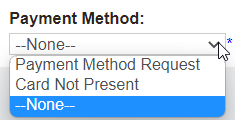
Once a payment method has been selected, press the Save button.

Once the payment method has been registered with the gateway provider, the Payment Method Register box will be ticked indicating the customer's details are on file.

Should the card details need to be updated or changed or the customer advises that they did not receive the e-mail to register their details, click on the Send Payment Registration Email button on the right-hand side of the page.