Mason Permit

Purpose
The Mason Permit feature in byondpro is used to record the receipt from a monumental mason of an application to erect a monument. Cemetery staff can verify the conditions of the application and issue the permit to the mason, granting permission to proceed and issuing paperwork. Staff can then monitor the building process and associated activities.
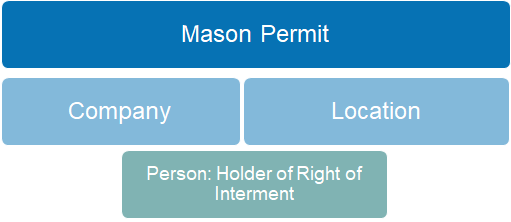
Permit records are linked to the company record for the monumental mason and display information on the mason's Safe Work Registration status.
The permit is linked with a cemetery location record and information on both the holder of right of interment and the person authorising the permit application are displayed for staff information.
Adding new Records
New Mason Permit entries are created from within a Sales & Booking record, and draw on the authorising person and location links on the summary page for system context. A permit record can be created with/out a sales invoice for the application fees. On the Permits screen, select New and enter field values.
Button Functions
|
Button
|
Description
|
|
Change Attributes
|
Switches to edit mode
|
|
Save
|
Updates the record
|
|
Permit Activity
|
Opens new Permit Action entry screen
|
|
Mason Permit
|
Report link to print/email Masons Permit
|
|
Reopen Permit
|
Sets permit status from Completed to Issued, allowing record changes
|
Field List
|
Field
|
Description
|
Associated Business Process
|
|
Mason Permit
Records the monumental mason, date and details of the application
| ||
|
Mason Permit ID
|
Unique identifier of Permit record
|
Auto-generated when record is saved
|
|
Permit Type
|
Selection List, including:
- Additional Work/Inscription - Application for Supply of Plaque
- Headstone Kerb/Ledger
- Renovation Work: minor/major - New Headstone & Base: single/double
- New Monument: single/double/triple
- Supply of approved Granite
- Subsequent Inspection
|
Denotes type of work to be performed
|
|
Status
|
Selection List, including:
- Submitted
- Issued
- Completed
- Rejected
- On Hold
- Expired
- Cancelled
|
|
|
Mason
|
Lookup to Company records
|
|
|
Mason Information
|
Displays Safe Work Registration number and status
|
Read only
|
|
Details
|
Free form text
|
To further describe or annotate application conditions
|
|
Inscription
|
Free form text
|
|
|
Location
Records site and Right of Interment holder
| ||
|
Site
|
Lookup to Cemetery
|
Auto-fills with site on Sales Summary
|
|
Location Code
|
Lookup to Cemetery Locations
|
Auto-fills with location on Sales Summary
|
|
Holder of Right
|
Lookup to Person records
|
Auto-fills with holder of right recorded on Location Summary
|
|
Details
Records applicant's details and dates of receipt, issue and completion
| ||
|
Applicant
|
Lookup to Person records
|
Auto-fills with Authorising Person on Sales Summary.
Used as visual cross-reference to rights holder
|
|
Sales & Bookings ID
|
Lookup to Sales records
|
Auto-fills/hyperlinks to source Sales ID
|
|
Date of Receipt
|
Date field to record when application is received
|
Defaults to current system date
|
|
Date of Issue
|
Date field to record when permit is issued/approved
|
Set when status is changed to Issued
|
|
Date Work Completed
|
Date field to record when works are completed
|
Set when status is changed to Completed
|
|
Permit Expiry Date
|
Date field to record when permit is due to expiry
|
Set +12 months when status is changed to Issued
|
Optional Fields
|
Field
|
Description
|
Associated Business Process
|
|
Completion Certificate
|
Checkbox to denote certificate to be issued
|
|
|
Completion Certificate Date
|
Date field to record when certificate was issued
|
|