Mason Permit Expiry
The Mason Permit Expiry Report displays a list of permits and their expiry dates.
Click on the Mason Permit Expiry hyperlink, or the blue arrow in line with the hyperlink.

On the resulting Parameters page, you may filter the displayed permits by site and mason, and by the date range in which the permits expire.
There is also an option to change how the displayed permits are sorted on the report, whether by date or mason.
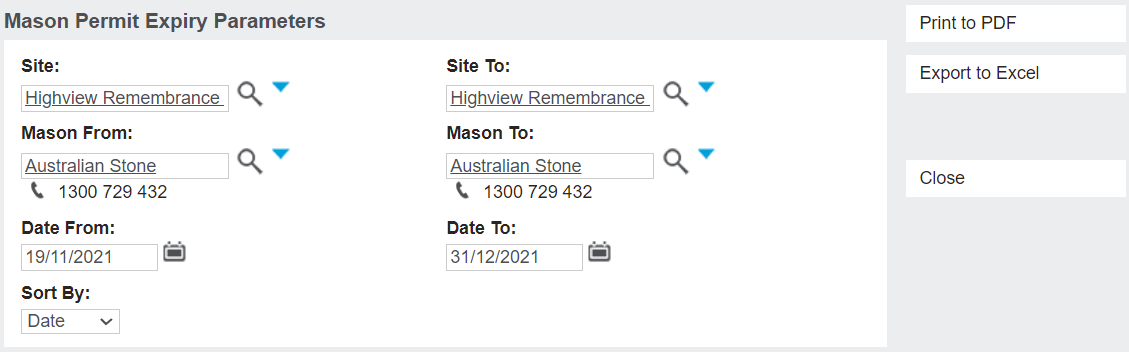
Click on the Print to PDF button to open the report in a PDF view.
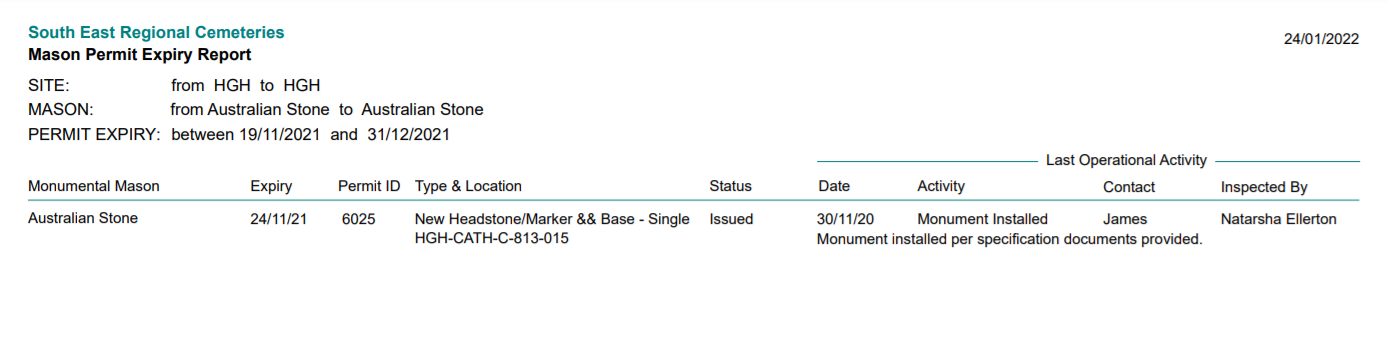
The resulting report shows a list of permits, with such information as:
-
Monumental Mason who completed the activity.
-
Expiry date of the permit.
-
Permit ID.
-
Type & Location of the works.
-
Status of the permit.And information about the Last Operational Activity:
-
Date the activity was completed.
-
Activity completed.
-
Contact person that was in contact with the cemetery in regards to the activity.
-
Who the activity was Inspected By.