Maintenance Notes

Purpose
Maintenance notes are intended for use by the outdoors team to record activities they are performing against a single location (grave, crypt or cremation memorial) or a series of areas and locations.
Fit within the Location Hierarchy
A maintenance note can be attached to any level of the location hierarchy and will be visible to all sub-ordinate records.
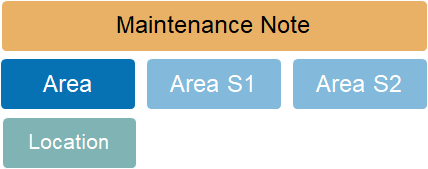
For example, a maintenance note created on an Area record is visible on the maintenance notes tab of the linked S1, S2 and Location records. The note can be edited from any access point and changes made are visible to all linked records.
A note created on the maintenance notes tab of an individual Location record is only visible against that single location record.
Adding new Records
New maintenance notes are created using the New button on the Maintenance tab of any Area, S1, S2 or Location record.
Standard Field List
|
Field
|
Description
|
Associated Business Process
|
|
Date
|
Date & time entry is created
|
|
|
Type
|
Maintenance
|
Fixed selection
|
|
User
|
System user that created the entry
|
|
|
Note
|
Free form text
|
|