Item Codes

Purpose
Items are created for every product (goods or services) that you use in sales transactions.
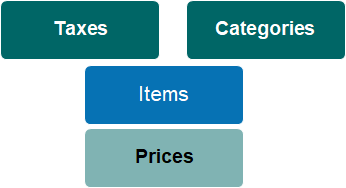
Fit within the Item & Pricing Hierarchy
Every item (product or service) is associated with a category and a tax code.
An item code can be used across different sites within your organisation, and pricing can be separately configured for each site.
Standard Field List
|
Field
|
Description
|
Associated Business Process
|
|
Status
|
Selection list defines if product is active or inactive
|
|
|
Code
|
Unique code for item / product
|
|
|
Description
|
Full name of item / product
|
As it appears on quotes and invoices
|
|
Territory
|
Parent territory/ site grouping to which item is assigned
|
If assigned to parent organisation (trust) then item is active in all subordinate territories. Can be associated with a single site.
|
|
Category
|
Link to category
|
Drives GL account allocations
|
|
Tax
|
Link to tax code
|
|
|
Unit of Measure
|
Text field to denote unit of measure
|
As it appears on quotes and invoices
|
|
Allow Price Edit
|
Checkbox controls whether prices can be edited in a sales transaction
|
|
|
Is ROI / Location
|
Checkbox controls Right of Interment processing rules
|
|
|
Is Package Item
|
Checkbox denotes if item is parent code for a group of products sold under this code
|
|
|
GL Package Variance Revenue Account
|
Text field to record GL revenue account used if pricing for package components is not equal to price of package
|
If site specific GL codes are active, will conform to these rules.
|
|
Update Location Tenure Expiry Date when invoice contains this item
|
Checkbox to indicate associated location tenure expiry date will be updated when this item is invoiced
|
|
|
Apply Tenure Period
|
Selection list of tenure periods, used in calculation of tenure expiry date, e.g. 5 years, 25 years, perpetuity.
|
Selected tenure period is added to existing tenure expiry date.
|
|
Allow Description edit
|
Checkbox to indicate that the description may be edited in sales transaction
|
|
|
Create preneed on invoice
|
When ticked, all sales of this item will go to the pre-need table regardless of whether the sale is at need or pre-need. Discuss this selection in detail with your OpusXenta consultant before actioning this tick box.
|
|
|
Calculate Renewal by Quality
|
Option for the unit of measure selection of either, each or year/s on the item.
|
|