How it Works
Before / After Sunset Field
The selection made in the before / after sunset field triggers whether the Hebrew Date of Death field is automatically populated.
The date displayed depends on the selection made.
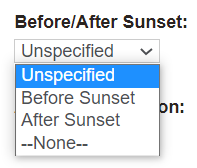
At least one option should be created by the system Administrator if the Yarhzeit Function is set to Y in custom configuration.
Select the appropriate before / after sunset option to trigger the calculation of the Hebrew Date of Death.
· Hebrew Date of Death is required to calculate Date of Death (in Hebrew) and Yahrzeit Anniversary.
|
Before / After Sunset Field Selections
|
Pre-Conditions
|
|
Unspecified
|
Where user enters:
The Hebrew Date of Death field is not populated, subsequently the convert dates function or the daily scheduler will not action calculation of Date of Death in Hebrew or Yahrzeit Anniversary.
 |
|
Before Sunset
|
Where user enters:
Hebrew Date of Death field will be set with the SAME date selected for the Date of Death field.
· On save the Date of Death (in Hebrew) is calculated and displayed.
· Users can choose the Convert Dates option on screen to populate the Yahrzeit Anniversary at the time of creating, viewing or editing the person record. (See further explanation below).
· Alternatively, the convert date function will run via the daily scheduler to calculate and display the Yahrzeit Anniversary.
 |
|
After Sunset
|
Where user enters:
Hebrew Date of Death will be set with the day AFTER the selected date for the Date of Death field.
· On save the Date of Death (in Hebrew) is calculated and displayed.
· Users can choose the Convert Dates option on screen to populate the Yahrzeit Anniversary at the time of creating, viewing or editing the person record. (See further explanation below).
· Alternatively, the convert date function will run via the daily scheduler to calculate and display the Yahrzeit Anniversary.
 |
Convert Dates
To trigger the calculation of the Yahrzeit Anniversary, users need to have selected either the before sunset or after sunset option from the Before / After Sunset drop down selection list which will have calculated and displayed the Hebrew Date of Death.
If the user selects the Convert Dates button while the screen is in edit mode, the API call is made to retrieve the Date of Death (in Hebrew) and the Yahrzeit Anniversary and place them in the appropriate fields.
Note if users do not select the Convert Dates button, the API call will trigger when the record is saved and update the fields in the background.

For example: Before Sunset -> Convert Dates Selected -> Yahrzeit Anniversary Displayed

For example: After Sunset -> Convert Dates selected- > Yahrzeit Anniversary Displayed

Hebrew Date of Death
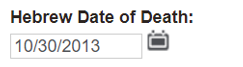
On saving the record, the system sets/fills the Hebrew Date of Death in line with the Date of Death and before / after sunset selections as shown above. Users can use the convert dates function prior to save to populate this field.
Date of Death (in Hebrew)
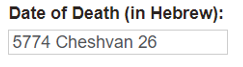
On saving the record, the system sets /fills the Date of Death (in Hebrew), in line with the value calculated and displayed in the Hebrew Date of Death field. Users can use the convert dates function prior to save to populate this field
Yarzheit Anniversary
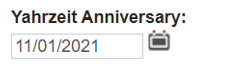
The user will be able to select/set a date for this element in order to see the next (or upcoming) Yahrzeit Anniversary date; corresponding to the date selected for Hebrew Date of Death by clicking on the Convert Dates function.
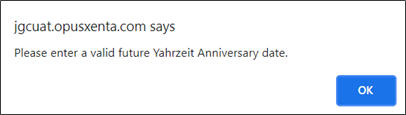
If a past date is selected an alert message will be displayed: Please enter a valid future Yahrzeit Anniversary date.
Where a user has already selected a date for the Yahrzeit Anniversary field, it will be overwritten by the converted next Yahrzeit Anniversary date to the corresponding date selected for the Hebrew Date of Death, when the user clicks on the Convert Dates function.
Nightly Scheduler
The system will automatically update Yahrzeit Anniversary date from the next (or upcoming) Yahrzeit Anniversary date by performing a nightly routine via a scheduler.
When the previous-selected date < current date. (For example, if the Yahrzeit Anniversary date is 18th Jan 2021, the user will be able to see the next Yahrzeit Anniversary date from 00:00:01 AM of 19th Jan 2021).
If this time-based job scheduler fails, an email notification will be sent to the admin account stored in Cemetery Setup.
Tracking
The following fields will be tracked by byondpro: Any changes will be added to the tracking tab on the person record.
-
Before / After Sunset
-
Hebrew Date of Death
-
Date of Death (in Hebrew)
-
Yahrzeit Anniversary