Fixing Errors
Once an error has been identified, it is important to fix it as soon as possible and resync the invoice if possible.
First, identify what the error is on the invoice.
In the below example, we see an error 1000 – G/L account 6030 is not defined in General Ledger.
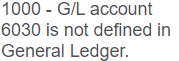
If the user checking the errors is not part of the finance team, they should discuss with finance to arrange for this general ledger account to be added to Sage 300.
Note: if this is an invalid general ledger account, it will still need to be created in Sage 300 (and can be inactivated later once the appropriate corrections have been made) in order to resync the invoice.
If this resolution is likely to cause concerns, reach out to your OpusXenta consultant to assist with troubleshooting the solution.
Once the general ledger account has been added, the invoice can be resynced (see details below in the topic ‘Resync Invoice Topic’).