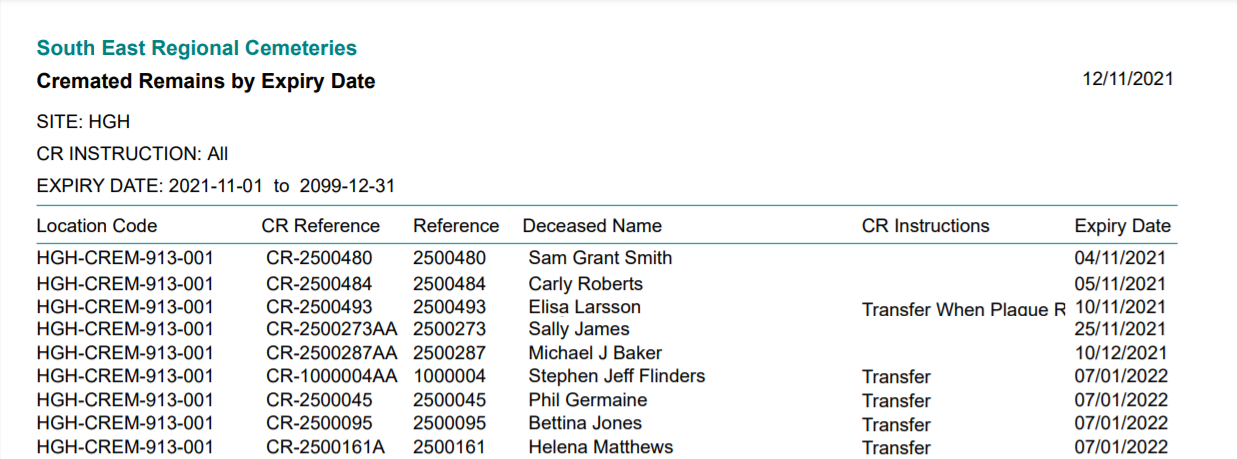
CR Expiry Report
The Cremated Remains Expiry report could be used to locate cremated remains currently held in storage, which are due to expire in the current location and then send bulk reminders to families.
To generate, choose the blue arrow in line with the Cremated Remains Expiry report
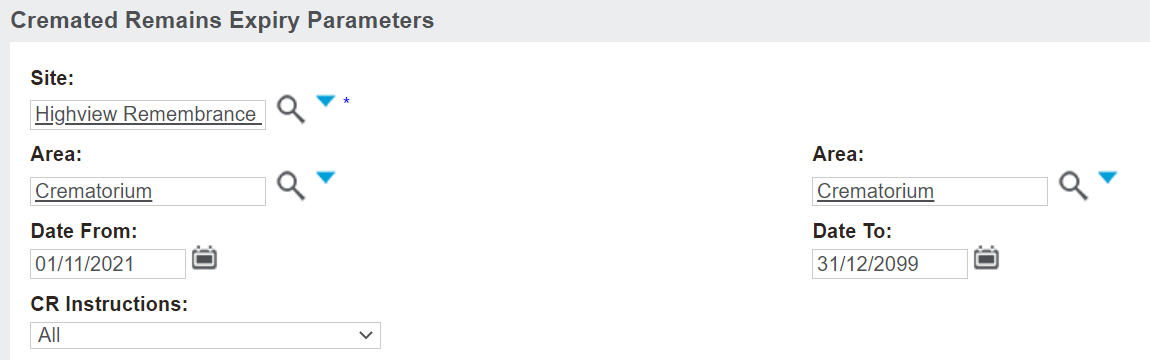
From the pop-up window which displays, complete the fields to narrow down the records which will display on the report.
Select the Site and the Area where the cremated remains currently are. In our example, we have chosen the Site of Highview Remembrance Park and the Area of the Crematorium.
In the Date From / To fields, determine the date range where the cremated remains will expire in this location.
In the CR Instructions field, select the CR Instruction the cremated remains records you are searching for, currently have. If no specific CR Instruction applies, leave the selection as 'All.'
Once all your search criteria have been entered, press Print to PDF on the right-hand side of the page.
All cremated remains records which meet the chosen criteria will display.